

On this page
What Upload Speed Do You Need for OTT Streaming?
Upload speed plays a critical role in OTT streaming quality. Whether you are running a live sports stream, broadcasting events, uploading VOD content, or managing an OTT platform, your upload bandwidth directly affects stream stability, video quality, latency, and viewer experience.
Unlike viewers, who mainly rely on download speed, broadcasters and streaming platforms depend heavily on upload speed to send video data from encoders and production systems to streaming servers.
The amount of upload speed required depends on several factors, including video resolution, bitrate, frame rate, encoder settings, streaming protocol, and whether the stream is live or on-demand.
Why Upload Speed Matters for OTT Streaming
Upload speed determines how quickly video data can be transmitted from your streaming setup to the internet. If the available upload bandwidth is too low, streams may buffer, lose quality, drop frames, or disconnect entirely.
For OTT platforms, stable upload speeds are especially important because live streaming workflows rely on continuous real-time delivery. Any network instability can affect viewers immediately.
Even VOD uploads depend on upload bandwidth. Slow upload speeds can dramatically increase content publishing times for movies, episodes, trailers, and large media files.
Upload Speed vs Bitrate
Many people confuse upload speed with bitrate, but they are not the same thing. Bitrate refers to the amount of video data being encoded per second, while upload speed is the total available internet bandwidth.
Your upload speed should always be higher than your streaming bitrate to maintain stability and prevent interruptions.
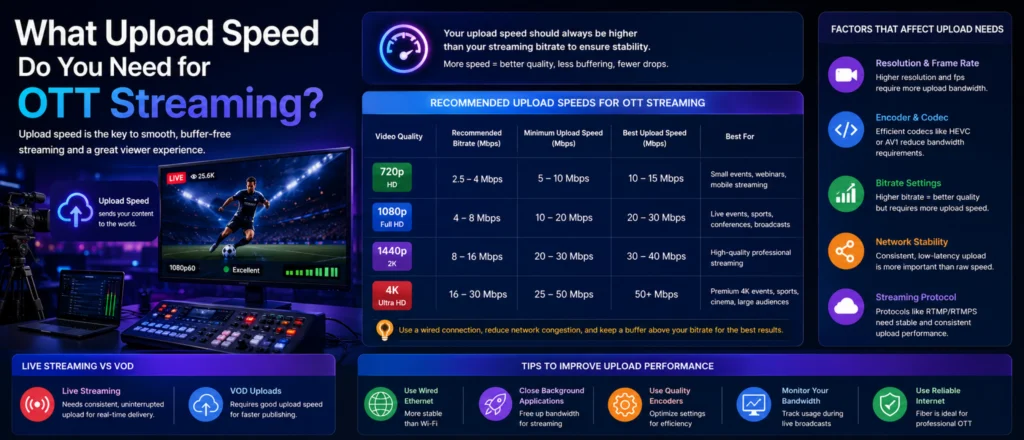
For example, a live stream running at 6 Mbps bitrate should ideally have at least 10–15 Mbps of stable upload bandwidth available. A common rule of thumb is an upload speed of at least 1.5 times, and preferably twice, your total bitrate. This extra capacity creates overhead for network fluctuations and streaming reliability.
Recommended Upload Speeds for OTT Streaming
For 720p live streaming, a bitrate of about 3–8 Mbps is typical, so plan for roughly 5–12 Mbps of stable upload speed.
For 1080p streaming, bitrates usually range from about 5 to 17 Mbps depending on frame rate and quality settings. Upload speeds of 10–25 Mbps are commonly recommended.
For 4K OTT streaming, upload requirements increase significantly. 4K bitrates range from about 15 Mbps for an efficient stream to 50 Mbps for high-quality 60 fps (YouTube, for example, recommends up to 50 Mbps for 4K at 60 fps with H.264). Plan for roughly 25–75 Mbps of stable upload, depending on frame rate and codec.
Platforms running multi-bitrate adaptive streaming may require even higher bandwidth because multiple renditions are generated simultaneously.
Live Streaming vs VOD Upload Requirements
Live streaming demands consistent, uninterrupted upload performance because video is transmitted in real time. Any bandwidth instability can cause buffering, stream drops, or degraded quality.
VOD uploads are more flexible because files can upload gradually over time, but large media libraries still require strong upload capacity for efficient publishing workflows.
OTT services managing large catalogs often use dedicated ingest infrastructure and high-bandwidth cloud workflows to speed up content delivery pipelines.
How Upload Speed Affects Video Quality
Insufficient upload bandwidth can reduce stream quality in several ways. Encoders may lower bitrate automatically, resulting in blurry or pixelated video.
Streams may also experience increased latency, dropped frames, audio synchronization problems, or playback interruptions.
For live sports, events, and premium OTT experiences, stable upload performance is essential for maintaining broadcast-quality delivery.
Factors That Affect OTT Upload Requirements
Video resolution is one of the biggest factors affecting upload requirements. Higher resolutions like 4K require significantly more bandwidth than 720p or 1080p streams.
Frame rate also matters. Streaming at 60fps requires more upload capacity than 30fps because more visual data is transmitted every second.
Encoder efficiency can also reduce bandwidth requirements. Modern codecs like HEVC and AV1 provide better compression than older codecs such as H.264.
Network stability is equally important. A high upload speed with unstable connectivity can still create poor streaming performance.
Upload Speed for Multi-Bitrate Streaming
Many OTT platforms use adaptive bitrate streaming to support different devices and internet conditions. This means multiple video quality versions are created simultaneously.
If encoding occurs locally before upload, upload bandwidth requirements increase because several renditions may be transmitted at once.
Cloud transcoding workflows can reduce local upload requirements by sending a single high-quality feed to the cloud for processing.
Best Internet Types for OTT Streaming
Fiber internet is generally the best option for OTT streaming because it offers high upload speeds and stable low-latency connections.
Cable internet can work well for smaller streaming operations, but upload speeds are often much lower than download speeds.
Mobile and wireless networks may support basic streaming but can introduce instability, congestion, and inconsistent upload performance during live broadcasts.
How to Improve Upload Performance
Using wired ethernet connections instead of Wi-Fi can improve streaming stability significantly.
Reducing background network activity helps preserve bandwidth for video transmission. Dedicated streaming networks are common for professional OTT production environments.
Modern encoders, optimized bitrate settings, and reliable CDN infrastructure also help improve overall stream quality and upload efficiency.
Monitoring real-time bandwidth usage during broadcasts can help identify network bottlenecks before they affect viewers.
Uploading and Streaming to AudiencePlayer
If you run your platform on AudiencePlayer, a few practical points help you get the most out of your connection:
- VOD uploads: upload files in the CMS through your browser, or in bulk via FTP or an S3-compatible client (see bulk video upload). A browser upload is only finished when the green check mark appears, so keep the tab open and your computer awake until then.
- Source files: HD sources should have a bitrate of at least 6,000 kbps and 4K sources at least 20,000 kbps, with a maximum of 25 GB per file (see the file upload specifications). Encoding starts after the upload and takes roughly as long as the video itself.
- Upload time: a 10 GB file takes about 27 minutes at a stable 50 Mbps, but more than two hours at 10 Mbps. For large libraries, FTP over a fast wired connection saves a lot of time.
- Live streams: with the live streaming module you send a single RTMP feed from your own encoder, such as OBS. The platform then delivers it to viewers with adaptive bitrate streaming, so you don’t need to upload multiple renditions yourself.
Why Upload Speed Matters for OTT Growth
As OTT streaming becomes more competitive, viewers expect stable high-quality video across all devices. Poor upload infrastructure can reduce stream reliability and damage audience retention.
Whether you are running a live sports platform, FAST channels, VOD service, or enterprise streaming system, upload speed is one of the core technical foundations behind video delivery quality.
Strong upload performance improves stream consistency, accelerates publishing workflows, and supports scalable OTT growth as video libraries and audiences expand.
Frequently Asked Questions
What upload speed do I need for OTT live streaming?
It depends on resolution and bitrate. As a guide, plan for about 5–12 Mbps for 720p, 10–25 Mbps for 1080p and 25–75 Mbps for 4K, and always keep your upload speed well above your stream bitrate.
Is upload speed the same as bitrate?
No. Bitrate is the amount of video data your encoder produces per second, while upload speed is the capacity of your internet connection. Your upload speed should be at least 1.5 to 2 times your bitrate.
Do viewers need a fast upload speed?
No. Viewers mainly rely on download speed. Upload speed matters for whoever sends the video: the broadcaster during a livestream or the team uploading VOD files.
How long does it take to upload a video file?
Divide the file size by your upload speed. A 10 GB file takes about 27 minutes at 50 Mbps and more than two hours at 10 Mbps, assuming the connection stays stable.
Is Wi-Fi good enough for uploading or live streaming?
For small uploads it can work, but a wired ethernet connection is far more stable. For live streams, a dedicated wired line is strongly recommended.