

On this page
Upload speed is one of the most important factors in live streaming quality. Whether you are streaming sports, events, webinars, gaming, or OTT broadcasts, your upload bandwidth determines how reliably video can be transmitted to viewers in real time.
Unlike video-on-demand uploads, live streaming cannot pause or buffer during transmission. If upload performance drops, viewers may immediately experience buffering, quality loss, dropped frames, or disconnected streams.
The best upload speed for live streaming depends on video resolution, bitrate, frame rate, encoder settings, and the overall complexity of the production workflow.
Why Upload Speed Matters for Live Streaming
Live streaming works by continuously sending encoded video data from your encoder or production system to a streaming server. This process requires stable, uninterrupted upload bandwidth.
If the available upload speed falls below the required bitrate, the stream may become unstable. This can cause pixelation, lag, increased latency, or stream failures.
For professional OTT streaming, upload consistency is often more important than raw peak bandwidth because live delivery depends on maintaining stable throughput over time.
Recommended Upload Speeds by Resolution
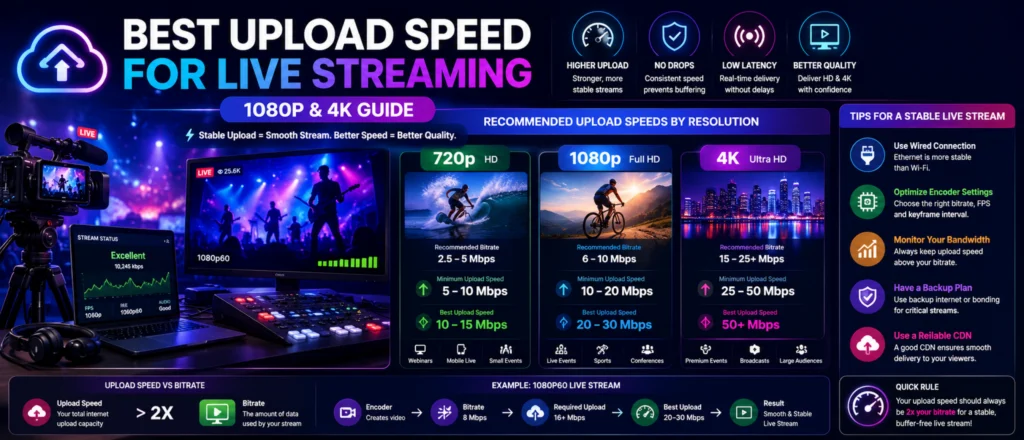
For basic 720p live streaming, a bitrate of about 3–8 Mbps is typical, so upload speeds of roughly 5–12 Mbps are recommended for stable delivery.
For 1080p streaming, bitrates usually range from about 5 Mbps (30 fps) to 17 Mbps (high-quality 60 fps). Most professional workflows therefore plan for 10–25 Mbps of upload bandwidth.
4K live streaming requires significantly more capacity. 4K bitrates range from about 15 Mbps for an efficient stream to 50 Mbps for high-quality 60 fps (YouTube, for example, recommends up to 50 Mbps for 4K at 60 fps with H.264). Plan for roughly 25–75 Mbps of stable upload speed. More efficient codecs such as HEVC can lower this, if your streaming platform accepts them.
These recommendations assume dedicated bandwidth for streaming without heavy network congestion from other devices or applications.
Bitrate and Upload Speed
Your upload speed should always exceed your target streaming bitrate. This creates overhead for network fluctuations and helps prevent stream instability.
For example, if your stream uses a 6 Mbps bitrate, your internet connection should ideally provide at least 10–15 Mbps of stable upload bandwidth. A common rule of thumb is at least 1.5 times, and preferably twice, your total bitrate.
Professional streaming environments often maintain even larger bandwidth buffers to reduce the risk of dropped frames during peak network usage.
How Frame Rate Affects Upload Requirements
Higher frame rates increase the amount of video data transmitted every second. Streaming at 60fps requires more bandwidth than 30fps, especially during fast-motion content such as sports or gaming.
OTT sports streaming platforms often prioritize higher frame rates to maintain smoother motion quality, which increases upload demands.
Balancing frame rate, resolution, and bitrate is important for maintaining stable live delivery without overloading available bandwidth.
Upload Speed for Multi-Bitrate Streaming
Many OTT platforms use adaptive bitrate streaming to support viewers across different internet conditions and devices.
If multiple renditions are encoded locally before upload, upload bandwidth requirements increase because several stream variants may be transmitted simultaneously.
Some workflows reduce local bandwidth requirements by uploading a single master feed to cloud transcoding infrastructure.
Best Internet Connections for Live Streaming
Fiber internet is generally the best option for live streaming because it provides high upload speeds, lower latency, and more stable performance.
Cable internet can support smaller streaming operations, but upload speeds are often limited compared to fiber connections.
Wireless and mobile networks may work for basic streaming, but they can introduce instability and inconsistent upload performance during live broadcasts.
Common Live Streaming Problems Caused by Slow Upload Speeds
Low upload bandwidth can cause blurry video, buffering, dropped frames, stream interruptions, and increased latency.
Viewers may also experience unstable playback quality if the stream bitrate fluctuates because of inconsistent network conditions.
For premium OTT broadcasts, especially sports and live events, poor upload performance can significantly impact audience retention and viewing experience.
How to Improve Live Streaming Stability
Using wired ethernet instead of Wi-Fi improves network stability and reduces interference.
Closing unnecessary background applications helps preserve upload bandwidth for streaming.
Professional streaming environments often use dedicated internet connections, backup failover networks, and bandwidth monitoring tools to maintain reliability during broadcasts.
Lowering bitrate slightly can also improve stability if upload bandwidth becomes inconsistent.
Live Streaming on AudiencePlayer
On AudiencePlayer, live streaming is a module you can add to your platform. You create a live-stream asset in the CMS and get an RTMP ingest URL and stream key, which you enter in your own encoder. OBS is a good software choice, and hardware switchers that stream RTMP directly also work.
You send one stream, and the platform delivers it to viewers with adaptive bitrate streaming, so your upload only has to carry a single feed. A few tips from practice:
- Use a dedicated wired connection rather than Wi-Fi or a shared office network.
- Rehearse with the same location, cameras, connection and encoder settings you will use on the day.
- Record the broadcast locally, for example in OBS. Live streams are not automatically saved as on-demand videos, so you upload the recording as a normal video afterwards.
Best Upload Speed Strategy for OTT Streaming
The ideal upload speed is not simply the fastest available connection. The goal is maintaining stable bandwidth that comfortably exceeds the target streaming bitrate.
OTT platforms, broadcasters, and live event operators should prioritize reliability, low latency, and network consistency alongside raw speed.
As live streaming quality expectations continue to rise, strong upload infrastructure becomes increasingly important for delivering professional OTT viewing experiences.
Frequently Asked Questions
What upload speed do I need to live stream in 1080p?
For 1080p at 30 fps with a bitrate of around 6 Mbps, plan for at least 10–15 Mbps of stable upload. For 60 fps or higher-quality encodes, 20–25 Mbps gives you a safe margin.
What upload speed do I need to live stream in 4K?
4K streams use roughly 15 to 50 Mbps of bitrate, so plan for about 25–75 Mbps of stable upload depending on frame rate and codec. A dedicated fibre connection is the safest choice.
How much faster should my upload speed be than my bitrate?
At least 1.5 times, and preferably twice your total bitrate, including audio. The extra capacity absorbs network fluctuations without dropped frames.
How do I test whether my connection is good enough?
Run several speed tests at the streaming location, at the same time of day as the broadcast, and look at the lowest stable result. Then do a test stream and watch your encoder for dropped frames.
Which encoder can I use to stream to AudiencePlayer?
Any encoder that can send RTMP with a stream URL and key, such as OBS or a hardware switcher with built-in streaming. You find the ingest URL and stream key on the live-stream asset in the CMS.