

On this page
4K streaming delivers significantly higher image quality than HD video, but it also requires much more bandwidth. Whether you’re broadcasting live events, streaming sports, running an OTT platform, or uploading premium video content, sufficient upload speed is essential for maintaining reliable 4K delivery.
Because 4K video contains four times the pixel count of 1080p content, more data must be transmitted every second. This increases both bitrate requirements and the amount of upload bandwidth needed to support stable streaming.
Without adequate upload speed, 4K streams may experience buffering, dropped frames, reduced quality, or playback interruptions.
Why 4K Streaming Requires More Upload Bandwidth
Higher resolutions generate larger video files and require higher bitrates to preserve image quality. While 1080p streaming can often perform well at moderate bitrates, 4K content needs substantially more data to maintain sharp visuals, fine detail, and smooth motion.
This becomes even more important for sports, gaming, concerts, and live events where fast-moving scenes require additional bitrate to avoid compression artifacts.
As a result, upload bandwidth requirements increase significantly when moving from HD to 4K workflows.
Recommended Upload Speed for 4K Streaming
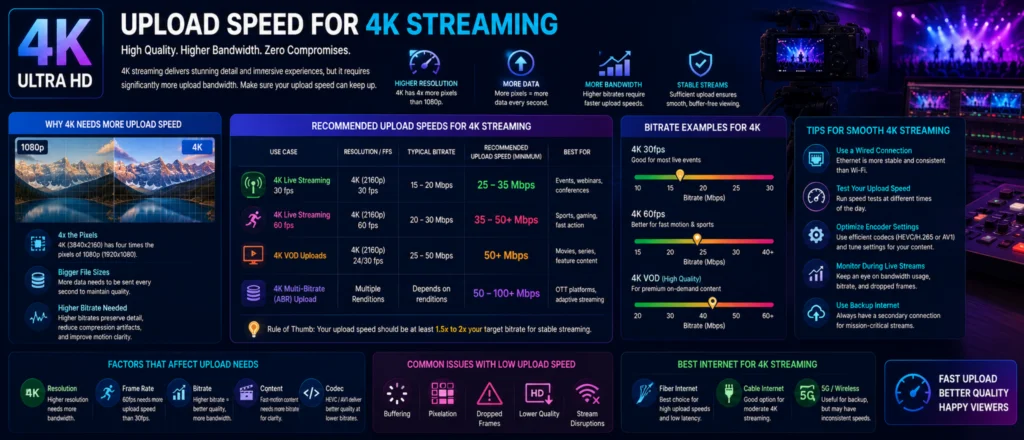
A practical rule of thumb is to keep your stream bitrate at no more than about two thirds of your measured, stable upload speed. For most 4K live streams that means a dedicated upload of at least 50 Mbps, and more for 4K at 60 frames per second with H.264.
Higher-end productions often require even more bandwidth, particularly when streaming at 60 frames per second, using premium quality settings, or delivering sports and live events.
Broadcasters should avoid running streams close to their maximum upload capacity. Maintaining bandwidth overhead helps protect against network fluctuations and improves reliability. Always measure your upload speed at the location and time of day you plan to stream, not just once at the office.
4K Bitrate Requirements
Bitrate plays a major role in determining upload speed requirements. Exact settings vary by codec, frame rate and platform, but published encoder recommendations for live 4K are roughly 30–42 Mbps at 30fps and 35–50 Mbps at 60fps, with the lower figures for HEVC (H.265) or AV1 and the higher ones for H.264. Always check the current recommendations of the platform you stream to.
Professional broadcasts may exceed these ranges when prioritizing maximum image quality.
Because bitrate directly consumes upload bandwidth, stream settings should always be matched to available network capacity.
Live 4K Streaming vs VOD Uploads
Live 4K streaming places the greatest demands on upload speed because video must be delivered continuously in real time.
Any bandwidth instability can immediately affect viewers through buffering, reduced quality, or stream interruptions.
Video-on-demand uploads are more flexible because content can upload over time, but large 4K media files still benefit from faster upload speeds to reduce publishing delays.
How Frame Rate Impacts Upload Requirements
Frame rate has a significant impact on bandwidth consumption. Streaming at 60fps requires more data than streaming at 30fps because twice as many frames are transmitted every second.
This is particularly important for sports, gaming, and action-heavy content where higher frame rates improve motion clarity.
Broadcasters planning 4K60 workflows should ensure sufficient upload capacity to support both resolution and frame rate requirements. For on-demand video, check what your platform does with frame rates first: on AudiencePlayer, uploaded videos are converted to 25 fps for compatibility with older devices, TVs and Chromecast, so a 60fps master mainly adds file size.
How Modern Codecs Reduce Bandwidth Usage
Modern codecs such as HEVC (H.265) and AV1 can deliver similar visual quality at lower bitrates compared to older codecs like H.264.
This reduces upload bandwidth requirements while maintaining strong image quality.
Many OTT platforms use advanced codecs to improve delivery efficiency and lower infrastructure costs.
4K Streaming for OTT Platforms
OTT services offering 4K content must consider upload bandwidth across multiple workflows, including content ingestion, live streaming, cloud transcoding, and adaptive bitrate delivery.
Large streaming platforms often upload high-quality master files to cloud infrastructure where multiple viewing formats are generated automatically.
This approach simplifies delivery while maintaining support for a wide range of devices and internet conditions.
On AudiencePlayer, 4K files have their own upload route: a 4K option in the CMS uploader and a dedicated UHD FTP route for larger batches. The platform then converts the file for adaptive streaming up to 4K. A few practical tips for 4K uploads:
- Deliver 8-bit H.264 with stereo AAC audio. 10-bit/HDR video, 5.1 surround audio and extra timecode or data tracks cause most failed uploads.
- Don’t push the bitrate to extremes. Very large, high-bitrate files mostly add upload time and a higher risk of timeouts.
- A browser upload is only finished when the green check mark appears, so keep the tab open and the computer awake. For whole libraries, use FTP.
The full requirements are in the file upload specifications and the guide to bulk uploads via FTP.
Common Problems Caused by Insufficient Upload Speed
When upload bandwidth is too low, 4K streams often suffer from pixelation, reduced image quality, buffering, and dropped frames.
Viewers may also experience increased latency during live broadcasts or automatic quality reductions as streaming systems attempt to compensate for limited bandwidth.
These issues are especially noticeable in high-resolution content because viewers expect premium visual quality from 4K experiences.
Best Internet Connection for 4K Streaming
Fiber internet is generally the preferred option for 4K streaming because it offers high upload speeds, low latency, and stable performance.
Cable connections may support some 4K workflows, but upload limitations can become a bottleneck for professional broadcasts.
For mission-critical live events, many broadcasters use dedicated connections and backup internet services to reduce the risk of interruptions.
Best Practices for Reliable 4K Streaming
Always maintain upload bandwidth above your target bitrate to allow room for network fluctuations. Using wired ethernet connections instead of Wi-Fi improves stability and reduces interference.
Monitoring bandwidth usage during broadcasts can help identify issues before they affect viewers. Run a full rehearsal with the same location, cameras, wired uplink and encoder settings you will use on the day.
OTT operators should also balance bitrate, codec efficiency, and upload capacity to achieve the best possible combination of video quality and reliability.
Why Upload Speed Matters for 4K OTT Growth
As audiences increasingly expect ultra-high-definition content, upload infrastructure becomes a critical part of OTT platform performance.
Reliable upload bandwidth supports better image quality, smoother broadcasts, faster content publishing, and more consistent viewer experiences.
For OTT platforms investing in premium video delivery, upload speed is one of the key foundations of successful 4K streaming. Want to see how 4K on-demand video and live streaming work on your own platform? Request a demo.
Frequently Asked Questions
What upload speed do I need to stream live in 4K?
Plan for a stable, dedicated upload of at least 50 Mbps for most 4K live streams, and more for 4K at 60fps in H.264. Keep your stream bitrate at about two thirds of your measured upload speed so there is headroom for fluctuations.
Can I stream 4K over Wi-Fi?
It is possible, but not recommended. Wi-Fi and shared connections are prone to interference and sudden drops, which show up immediately in a live stream. Use a wired ethernet connection, ideally a dedicated line.
Does upload speed matter when I upload 4K videos on demand?
Less than for live, because the file does not have to arrive in real time. A faster connection mainly shortens the wait before processing starts, and for large libraries FTP is more reliable than a browser upload.
Is H.265 or AV1 better than H.264 for 4K?
HEVC (H.265) and AV1 deliver similar quality at a lower bitrate, which reduces the upload bandwidth you need. Check that your encoder and streaming platform support them, as H.264 is still the most widely compatible choice.
What internet speed do viewers need to watch 4K?
Viewers typically need a stable download of around 15–25 Mbps and a 4K screen. With adaptive bitrate streaming, viewers on slower connections automatically get a lower resolution instead of endless buffering.