

On this page
Upload Speed Requirements for OTT Platforms
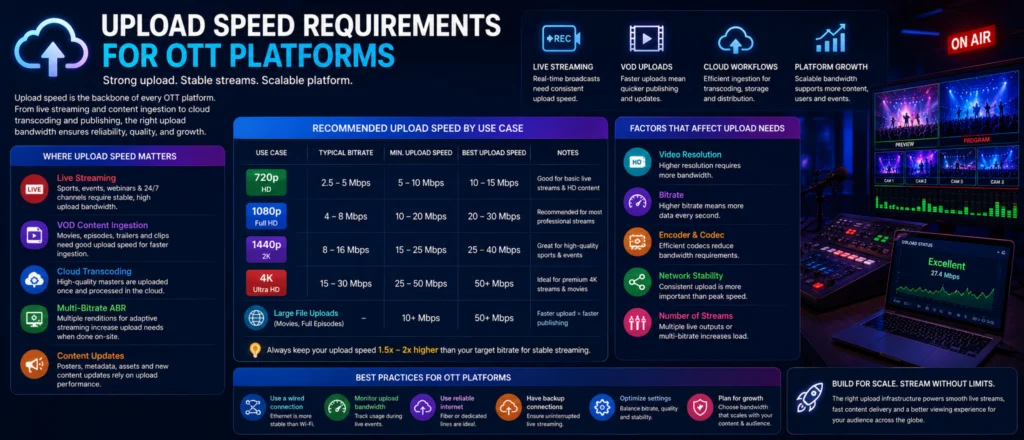
Upload speed is one of the most important technical requirements for OTT platforms. Every video uploaded, livestream broadcast, sports feed, movie release, or content update relies on sufficient upload bandwidth to move video content into streaming infrastructure.
Unlike viewers, who primarily depend on download speed to watch content, OTT operators depend on upload speed to ingest, publish, and distribute video assets efficiently.
The amount of upload bandwidth required depends on factors such as video resolution, bitrate, content volume, live streaming requirements, transcoding workflows, and platform scale.
Why Upload Speed Matters for OTT Platforms
Every OTT platform has an ingestion workflow where content is transferred from creators, broadcasters, production teams, or studios into the platform’s infrastructure.
If upload bandwidth is limited, content publishing becomes slower and livestream reliability can suffer. This can delay content availability, increase operational inefficiencies, and create poor viewing experiences during live events.
As video libraries grow, upload performance becomes increasingly important for maintaining scalable content operations.
Upload Speed for Video-on-Demand Platforms
VOD platforms regularly upload movies, episodes, trailers, promotional content, and short-form videos. While these uploads are not time-sensitive like livestreams, large media files can quickly consume available bandwidth.
A single HD video file may be several gigabytes in size, while 4K content can be significantly larger. Faster upload speeds reduce publishing times and improve operational efficiency.
As an example, a one-hour HD master at 8 Mbps is about 3.6 GB and takes roughly 25 minutes to upload over a stable 20 Mbps connection. A one-hour 4K master at 25 Mbps is about 11 GB: more than an hour at 20 Mbps, but around 15 minutes at 100 Mbps.
For OTT businesses managing large content catalogs, upload performance directly affects how quickly new content becomes available to viewers.
Upload Speed for Live Streaming
Live streaming places much higher demands on upload bandwidth because video must be transmitted continuously in real time.
Unlike VOD uploads, livestreams cannot pause and resume without affecting viewers. Stable upload performance is critical for maintaining video quality, reducing latency, and preventing dropped frames.
Sports streaming, live events, conferences, and premium broadcasts typically require higher upload capacity than standard VOD publishing workflows.
How Resolution Affects Upload Requirements
Higher video resolutions require more bandwidth because larger amounts of video data must be transmitted.
For live streaming, typical planning figures are:
- 720p: about 3–8 Mbps bitrate, so roughly 5–12 Mbps of stable upload.
- 1080p: about 5–17 Mbps bitrate depending on frame rate, so roughly 10–25 Mbps of upload.
- 4K: about 15–50 Mbps bitrate, so roughly 25–75 Mbps of upload.
As OTT platforms move toward higher-quality viewing experiences, upload infrastructure must scale accordingly. See our guide to the best upload speed for live streaming for more detail per resolution.
Bitrate and Upload Bandwidth
Bitrate determines how much video data is transmitted every second. Upload speed determines whether that bitrate can be delivered reliably.
OTT operators should maintain bandwidth overhead above the target bitrate to account for network fluctuations and maintain stream stability.
A common recommendation is to keep available upload speed at least 1.5 to 2 times higher than the outgoing bitrate for live streaming applications.
Cloud Transcoding and Upload Requirements
Many OTT platforms use cloud transcoding services to generate multiple video renditions for adaptive bitrate streaming.
In these workflows, content is uploaded once to cloud infrastructure, which then creates additional streaming formats automatically.
This reduces local upload requirements compared to workflows that generate and upload multiple renditions from on-premise infrastructure.
Upload Speed for Adaptive Bitrate Streaming
Adaptive bitrate streaming improves viewer experience by delivering different video qualities based on device capabilities and network conditions.
If multiple bitrate versions are generated locally, upload requirements increase because several streams may need to be transmitted simultaneously.
Cloud-based workflows can simplify this process by creating adaptive renditions after the initial upload.
Bandwidth Planning for Growing OTT Platforms
As OTT platforms expand, upload requirements often grow alongside content libraries, livestream operations, and audience expectations.
Businesses should plan for future bandwidth demands rather than only current needs. New content formats, higher resolutions, and increased production volume can quickly consume available upload capacity.
Scalable infrastructure helps avoid bottlenecks as streaming operations become more complex.
Common Problems Caused by Limited Upload Speed
Insufficient upload bandwidth can create slow content publishing, livestream buffering, increased latency, dropped frames, and failed broadcasts.
Large file uploads may take significantly longer than expected, delaying content availability and operational workflows.
For live OTT services, upload bottlenecks can directly affect viewer satisfaction and platform reliability.
Best Internet Connections for OTT Operations
Fiber internet is typically the preferred option for OTT platforms because it offers higher upload speeds, lower latency, and more consistent performance.
Cable internet may support smaller OTT operations but often provides limited upload capacity compared to fiber connections.
Professional broadcasters frequently use dedicated network connections, redundant internet providers, and failover systems to maintain uninterrupted streaming operations.
Uploading to AudiencePlayer
On AudiencePlayer, you upload one source file per video and the platform encodes it into several qualities for adaptive streaming, so you never upload multiple renditions yourself. A few practical points from the file upload specifications:
- Deliver MP4 with 8-bit H.264 video at 25 fps and stereo AAC audio, with a minimum video bitrate of 6,000 kbps for HD and 20,000 kbps for 4K.
- Keep each file under 25 GB. For many or large files, bulk upload via FTP is more convenient than the browser.
- A browser upload is only finished at the green check mark. If it fails, re-upload with a new file name, for example with “-v2” added.
- After the upload, encoding takes roughly the running time of the video, so plan premieres a few days ahead.
For live streaming, a module you can add to your platform, you send one RTMP stream from your own encoder and AudiencePlayer handles the adaptive delivery to viewers.
Building an OTT Platform for Scale
Upload speed should be viewed as part of a broader OTT infrastructure strategy rather than a standalone metric.
Successful streaming platforms combine sufficient upload bandwidth with efficient encoding, cloud processing, CDN delivery, and scalable storage systems.
As content libraries, livestreams, and audience demand continue to grow, strong upload infrastructure becomes essential for maintaining reliable OTT performance and supporting long-term platform growth.
Frequently Asked Questions
What upload speed does an OTT platform need?
For on-demand content, any stable connection works; a faster one simply shortens upload times. For live streaming, plan for 1.5 to 2 times your stream bitrate, for example 10–15 Mbps for a 6 Mbps 1080p stream.
How long does it take to upload a one-hour video?
It depends on file size and upload speed. A 3.6 GB HD file takes about 25 minutes at 20 Mbps, while an 11 GB 4K file takes more than an hour at that speed.
Do I need to upload several versions of each video for adaptive streaming?
Not with cloud transcoding. On AudiencePlayer you upload one source file, and the platform creates the different qualities for adaptive streaming.
What is the best way to upload a large video library?
Use bulk upload via FTP or an S3-compatible client over a wired, fast connection. On AudiencePlayer, place the files directly in your upload folder, without sub-folders, and they are ingested automatically.
Why does a video still show as processing after the upload?
After the upload, the video is encoded into several qualities, which takes roughly as long as the video itself. If an asset shows an error, the asset page tells you why, for example an unsupported audio or data track.