Best Upload Speed for Live Streaming
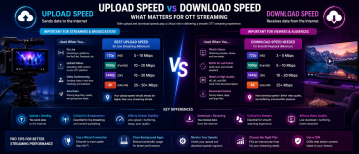
Upload speed is one of the most important factors in live streaming quality. Whether you are streaming sports, events, webinars, gaming, or OTT broadcasts, your upload bandwidth determines how reliably video can be transmitted to viewers in real time.
Unlike video-on-demand uploads, live streaming cannot pause or buffer during transmission. If upload performance drops, viewers may immediately experience buffering, quality loss, dropped frames, or disconnected streams.
The best upload speed for live streaming depends on video resolution, bitrate, frame rate, encoder settings, and the overall complexity of the production workflow.
Why Upload Speed Matters for Live Streaming
Live streaming works by continuously sending encoded video data from your encoder or production system to a streaming server. This process requires stable, uninterrupted upload bandwidth.
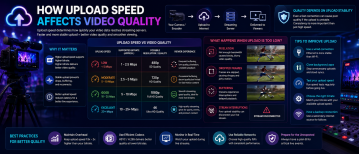
If the available upload speed falls below the required bitrate, the stream may become unstable. This can cause pixelation, lag, increased latency, or stream failures.
For professional OTT streaming, upload consistency is often more important than raw peak bandwidth because live delivery depends on maintaining stable throughput over time.
Recommended Upload Speeds by Resolution
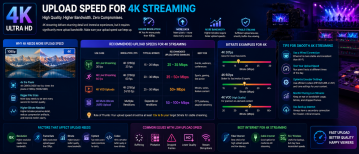
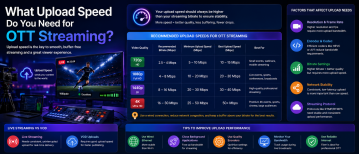
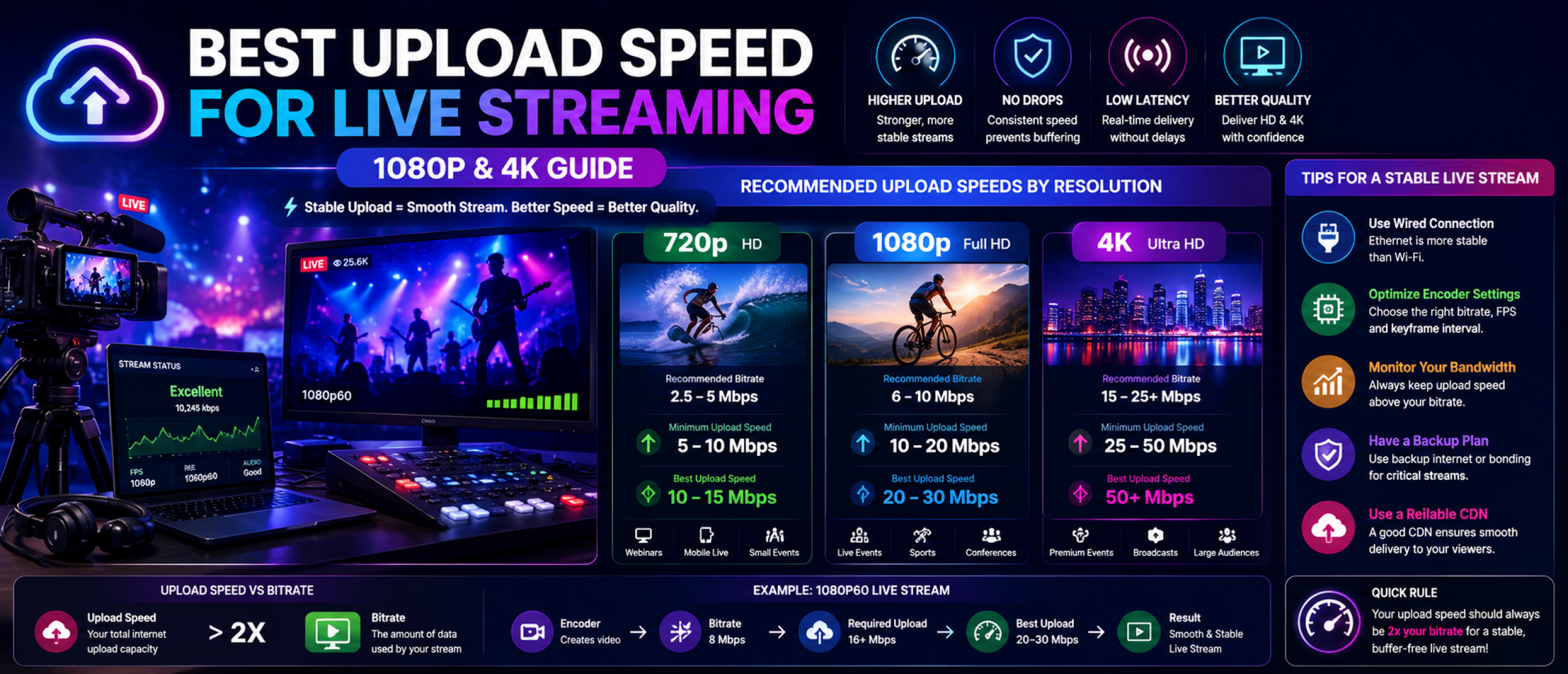
For basic 720p live streaming, upload speeds between 5 and 10 Mbps are generally recommended for stable delivery.
For 1080p streaming, most professional workflows require at least 10–20 Mbps upload bandwidth depending on encoder quality and frame rate.
4K live streaming requires significantly more capacity. Professional 4K broadcasts often need 25–50 Mbps or higher upload speeds to maintain stable high-quality delivery.
These recommendations assume dedicated bandwidth for streaming without heavy network congestion from other devices or applications.
Bitrate and Upload Speed
Your upload speed should always exceed your target streaming bitrate. This creates overhead for network fluctuations and helps prevent stream instability.
For example, if your stream uses a 6 Mbps bitrate, your internet connection should ideally provide at least 10–15 Mbps of stable upload bandwidth.
Professional streaming environments often maintain even larger bandwidth buffers to reduce the risk of dropped frames during peak network usage.
How Frame Rate Affects Upload Requirements
Higher frame rates increase the amount of video data transmitted every second. Streaming at 60fps requires more bandwidth than 30fps, especially during fast-motion content such as sports or gaming.
OTT sports streaming platforms often prioritize higher frame rates to maintain smoother motion quality, which increases upload demands.
Balancing frame rate, resolution, and bitrate is important for maintaining stable live delivery without overloading available bandwidth.
Upload Speed for Multi-Bitrate Streaming
Many OTT platforms use adaptive bitrate streaming to support viewers across different internet conditions and devices.
If multiple renditions are encoded locally before upload, upload bandwidth requirements increase because several stream variants may be transmitted simultaneously.
Some workflows reduce local bandwidth requirements by uploading a single master feed to cloud transcoding infrastructure.
Best Internet Connections for Live Streaming
Fiber internet is generally the best option for live streaming because it provides high upload speeds, lower latency, and more stable performance.
Cable internet can support smaller streaming operations, but upload speeds are often limited compared to fiber connections.
Wireless and mobile networks may work for basic streaming, but they can introduce instability and inconsistent upload performance during live broadcasts.
Common Live Streaming Problems Caused by Slow Upload Speeds
Low upload bandwidth can cause blurry video, buffering, dropped frames, stream interruptions, and increased latency.
Viewers may also experience unstable playback quality if the stream bitrate fluctuates because of inconsistent network conditions.
For premium OTT broadcasts, especially sports and live events, poor upload performance can significantly impact audience retention and viewing experience.
How to Improve Live Streaming Stability
Using wired ethernet instead of Wi-Fi improves network stability and reduces interference.
Closing unnecessary background applications helps preserve upload bandwidth for streaming.
Professional streaming environments often use dedicated internet connections, backup failover networks, and bandwidth monitoring tools to maintain reliability during broadcasts.
Lowering bitrate slightly can also improve stability if upload bandwidth becomes inconsistent.
Best Upload Speed Strategy for OTT Streaming
The ideal upload speed is not simply the fastest available connection. The goal is maintaining stable bandwidth that comfortably exceeds the target streaming bitrate.
OTT platforms, broadcasters, and live event operators should prioritize reliability, low latency, and network consistency alongside raw speed.
As live streaming quality expectations continue to rise, strong upload infrastructure becomes increasingly important for delivering professional OTT viewing experiences.