


On this page
If you sell access to your videos, you want to make sure people can’t simply download them or record their screen and share the result. DRM protection is the main tool for this. It encrypts your videos so that a downloaded file is useless, and on many devices it makes protected video show up black in screen recordings and screenshots. No technology makes piracy impossible, but the right combination of measures stops the vast majority of it. In this article we focus on the practical side: how videos get copied, what stops each method, and where the limits are. For a technical explanation of Widevine, FairPlay and PlayReady, read our DRM explainer.
How streamed video gets copied
Streamed video isn’t one file. It is delivered in small segments that the player stitches together. That makes casual saving harder, but there are well-known ways around it:
- Download tools and browser extensions that collect the segments of a stream and merge them into a single video file.
- Screen recording with built-in tools on a computer or phone, or with recording software.
- Account sharing, where one paid login is passed around to friends or posted online.
- Filming the screen with a phone or camera.
Each of these needs a different answer, which is why good video security works in layers.
Preventing illegal downloads
The first step is encryption. When your video segments are encrypted, a download tool can still grab them, but without the key the result won’t play. How well this works depends on how the key is handled:
- Basic encryption (AES-128, also called ClearKey) stops casual downloading. The key is delivered in a way that a determined user can intercept, so it is a basic layer rather than full protection.
- Full DRM hands the key only to a secure DRM module inside the browser or device, and only after the platform has checked that the viewer is allowed to watch. The key and the decrypted video never become available to other software, which defeats most download tools.
For free or low-value content, basic encryption can be enough. For paid films, series, courses and live events, full DRM is the standard.
Preventing screen capture
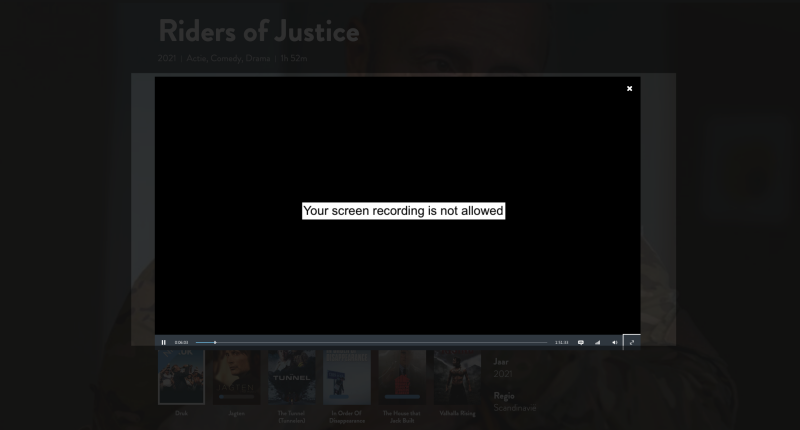
Encryption alone doesn’t stop someone from recording what appears on the screen. That requires DRM that works together with the operating system and the hardware. When a device plays DRM-protected video through a protected path, screen recordings and screenshots show a black area instead of the video. A few things to know:
- Hardware-backed DRM gives the strongest protection. Widevine at its highest security level (L1), FairPlay on Apple devices and PlayReady on many TVs and Windows devices protect the video all the way to the screen.
- Results differ per device and browser. On devices with only software-based protection, screen capture blocking is less reliable. That’s why rights holders often limit those devices to lower resolutions.
- Basic encryption doesn’t block screen capture at all. If someone can record your video in Safari, for example, it usually means FairPlay isn’t active and the stream only uses basic encryption.
More than DRM: the other layers
DRM protects the video itself. Other measures make sure the right people get access:
- Access control: only logged-in viewers with a valid subscription or purchase can start a stream.
- Concurrent stream limits: limiting how many devices can watch at the same time on one account makes sharing a login much less attractive.
- Geo-restriction: decide per video in which countries it can be watched, which matters when your rights are limited to certain regions.
- A legal alternative: viewers who want to watch offline are less tempted to rip a video if your own mobile app lets them download it to watch on the go.
What DRM can’t stop
Be realistic, and set the same expectations with rights holders. DRM stops casual copying and most download tools, but determined pirates find ways around any protection, and nothing prevents someone from pointing a camera at a screen. Some older devices don’t support full DRM and fall back to basic encryption. DRM makes piracy considerably harder and less worthwhile; it doesn’t make it impossible.
Protecting your videos with AudiencePlayer
On AudiencePlayer, video security is a module you can add to your platform: DRM, screen capture protection and geo-restriction, on your website, in your mobile apps and in your smart TV apps, for video on demand and live streams. ClearKey (AES-128) is the basic encryption layer, and full multi-DRM with Widevine, FairPlay and PlayReady comes on top. A few practical points:
- Protection per device: Chrome, Android and Windows use Widevine, at level L1 where the device supports it. Apple devices use FairPlay once it is enabled for your platform; with FairPlay active, screen recordings and screenshots in Safari turn black. Some older smart TVs and Chromecast devices fall back to ClearKey.
- Existing videos need a republish. DRM isn’t applied retroactively. Unpublish and republish existing videos with DRM enabled; it takes seconds per video and causes no downtime. New uploads are protected automatically.
- Account sharing: you can set a maximum number of concurrent streams per subscription tier.
See the pricing page for all modules, or request a demo to see how your content is protected.
Frequently Asked Questions
Can viewers download videos from my streaming platform?
Without encryption, download tools and browser extensions can save a stream fairly easily. With encryption a downloaded file won’t play without the key, and with full DRM the key is never exposed, which defeats most download tools.
Why can someone still screen-record my video in Safari?
Usually because the stream only uses basic encryption and not FairPlay, Apple’s DRM. Basic encryption doesn’t block screen capture. On AudiencePlayer, FairPlay is enabled per platform, and once it is active, recordings and screenshots in Safari turn black.
Can DRM stop someone filming the screen with a phone?
No. DRM protects the digital path from server to screen, but it can’t prevent someone from filming the screen with another device. That’s why DRM reduces piracy rather than eliminating it.
How do I stop subscribers from sharing their login?
Limit the number of devices that can stream at the same time on one account. On AudiencePlayer you set a maximum number of concurrent streams per subscription tier.
Does DRM work on every device?
Modern browsers, phones, tablets and most smart TVs support DRM. Some older smart TVs and casting devices don’t support full DRM and fall back to basic encryption, so they get less protection against screen capture.