


On this page
If you sell or share videos online, the short answer is: don’t just wrap your website in an app shell, but publish native iOS and Android apps that use the same content, accounts and subscriptions as your website. There are three ways to get there: build the app yourself, hire an app developer, or use a video platform that includes apps. In this article we compare the options and explain what the app stores expect from you, whichever route you choose.
Why your video platform needs an app
Most people watch online video on their phone, and a website in a mobile browser is not the experience they expect from a streaming service. A native app adds things a website can’t offer as well:
- Always one tap away: your icon sits on the home screen, next to the big streaming services.
- Push notifications: tell viewers about a new episode or a livestream that is about to start.
- Offline viewing: viewers download a class or film and watch it on the train or plane.
- Casting and background play: send the video to the TV with Chromecast or AirPlay, or keep audio playing while using another app.
- Credibility: being in the App Store and Google Play under your own name makes your platform feel like a real service.
Whether you offer workouts, online courses, films or church services, apps help viewers come back more often. We look at the effect on retention in more detail in Do mobile apps help improve video platform retention.
Why a wrapped website is not enough
The quickest-sounding route is a tool that puts your existing website inside an app shell (a so-called webview app). For a video platform, that usually disappoints. Apple’s App Store guidelines reject apps that are little more than a repackaged website, and even if a wrapper is approved, it rarely supports offline downloads, casting or a smooth player.
A progressive web app (PWA) is another middle ground: visitors can add your website to their home screen from the browser. That costs little, but your platform won’t be found in the app stores, and features like offline video and in-app purchases are limited. For a serious streaming service, native apps are the standard.
Three ways to turn your website into an app
1. Build it yourself
You have full control over design and features, but you need developers for iOS and Android, a secure video player, DRM, payments and a backend that keeps app and website in sync. After launch, the work continues: every new iOS and Android version and every store policy change needs maintenance. This is realistic only if you have your own development team.
2. Hire an app developer
An agency builds the app to your wishes, which saves you hiring developers. You still pay for the build, for maintenance, and for connecting the app to your video hosting, user accounts and payments. Ask upfront who handles updates when Apple or Google change their requirements, because that happens several times a year.
3. Use a video platform with apps
A complete video platform delivers website and apps from one management environment. You manage your videos, subscriptions and users once, and they appear everywhere. The platform provider maintains the apps and releases updates, so you can focus on your content. This is usually the fastest and most predictable route for organisations without their own development team.
What the app stores expect from you
Whichever route you choose, Apple and Google have the final say. These are the steps that most often cause delays:
- Your own developer accounts: apps are published under your name, so you need your own Apple Developer and Google Play developer accounts. Verification can take a while, so start early.
- Agreements and forms: only the account holder can accept new Apple agreements and complete forms such as age ratings, data safety and, for the EU, the Digital Services Act trader declaration. Until that is done, apps can’t be submitted or updated.
- A working test account: reviewers need login details with access to all content. A test account without access is a common reason for rejection.
- How you sell: either you sell subscriptions through Apple and Google in-app purchases, or the app shows only a login and viewers buy on your website. In that case the app must not show prices, sign-up links or “subscribe here” buttons.
- Review time: Google usually takes a few days to a week; Apple varies and can ask for changes. Build in buffer before a launch date.
Apps with AudiencePlayer
With AudiencePlayer you start with your own video platform: a website in your branding, built with the website builder. Native iOS and Android apps are a module you add. Your apps use the same content, subscriptions and accounts as your website, and you assemble them with building blocks in the management environment. They are published under your own name in the App Store and Google Play, with push notifications, offline downloads, in-app payments, Chromecast and AirPlay.
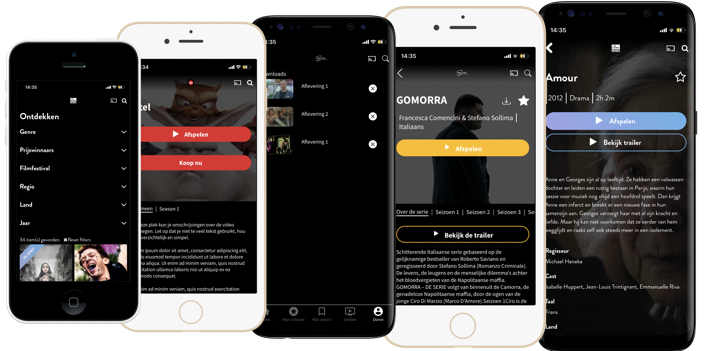
On AudiencePlayer, a few things are good to know before you start:
- You create the store accounts and invite AudiencePlayer as admin, after which AudiencePlayer builds and submits the apps. You test them first through TestFlight (iOS) and an internal test link (Android).
- The apps have their own pages and menus in the CMS, and they have a fixed dark theme with your logo, splash screen and colours. Content changes appear when the app restarts; branding changes need a new build.
- Decide on push notifications before the first build. They need a Firebase project and some extra setup, and adding them later means a new submission.
Want to bring your platform to the big screen as well? Add smart TV apps for Samsung and LG, or Android TV in beta. Curious what your own app would look like? Request a demo.
Frequently Asked Questions
Can I turn my website into an app for free?
You can let visitors add your website to their home screen as a progressive web app, which costs little. A real app in the App Store and Google Play needs developer accounts, a build and ongoing maintenance, so it is never completely free.
Will Apple accept an app that simply shows my website?
Often not. Apple’s guidelines reject apps that offer little more than a repackaged website. A native video app with its own player, downloads and casting has a much better chance.
Do I need my own Apple and Google developer accounts?
Yes, if you want the apps under your own name. On AudiencePlayer you create and verify the accounts yourself and invite AudiencePlayer as admin, so the apps and their listings stay yours.
Can I sell subscriptions in my app without paying Apple or Google commission?
Yes, if the app only shows a login and viewers buy on your website, with no prices or sign-up links in the app. The alternative is in-app purchases through Apple and Google, which AudiencePlayer supports. Apple and Google always have the final say in review.
How long does it take before my app is in the stores?
Google review usually takes a few days to a week, while Apple varies. Account verification, accepting agreements and possible rejections add time, so plan several weeks of buffer before an important launch date.