


On this page
To sell videos online, you need three things: content a specific audience is willing to pay for, a revenue model that suits them, and a place to sell where you set the price and keep the customer relationship. That place can be a marketplace, but more and more creators and organisations use their own video platform. This guide takes you through it in seven steps, from choosing your audience to expanding to apps and TV.
One honest note first: how much you earn depends on your niche, your audience and how consistently you work on it. There is no shortcut, but with a clear plan you can build a video business that grows steadily.
1. Find your niche audience
Start with a clear picture of who you are selling to. What are their interests, what problem do they want solved and what are they already watching? Write a short profile of your ideal customer.

Then look at what is already on offer, for example on YouTube, social media and paid platforms in your field. Ask yourself what makes you different: your expertise, your style, a format nobody else offers. A narrow audience with a real need is easier to sell to than a broad one with plenty of free alternatives.
2. Make your content plan
Now decide exactly what you will offer. Answer these questions:
- What kind of videos will you sell: courses, workouts, films, masterclasses, live events?
- How will you produce them? A good smartphone, microphone and editing software are often enough to start.
- How often will you add new content? Regular releases give people a reason to keep paying.
- Are there partners whose content you can add, such as other experts, brands or distributors?
3. Choose your revenue model and set realistic goals
Decide how people will pay. The most common models are a subscription for ongoing access, a one-off purchase or rental per video or series, and paid live events. Many platforms combine them. Our article on charging monthly or one-time helps you choose.
Then make a simple financial overview before you start:
- What price fits your audience and what similar offers charge?
- What are your fixed costs, such as platform, production and your own time?
- Which costs grow with your audience, such as streaming and storage?
- How many paying customers do you need to cover those costs, and how will you reach them?
On AudiencePlayer, payments run through your own Mollie or Stripe account, with one payment provider connected per platform. You need it even if you only give away free access through vouchers. Vouchers and discount codes help you sell: create thousands of unique codes at once for campaigns, partners or gifts, or a custom code of at least 8 characters. If you sell a subscription only through vouchers, keep it active but hidden from your storefront, because an inactive plan can’t be issued through a voucher.
4. Create your online marketing plan
Based on your financial overview, decide how much time and budget go into marketing. The channels that work for most video sellers:
- Short-form video on TikTok, Instagram Reels and YouTube Shorts, showing a taste of what you offer.
- Email marketing, so you can reach interested people directly with new releases and offers.
- Search engine optimisation and blogs that answer questions your audience searches for.
- Partnerships and referrals, for example with organisations that already serve your audience.
- Paid ads on search engines and social media, once you know which message converts.
5. Set up your video website
Prepare a brand name, logo, colours and your own domain name. Then build a website where people can browse, buy and watch your videos. Selling on your own platform means you set the prices, you own the customer data and no algorithm decides who sees your content.
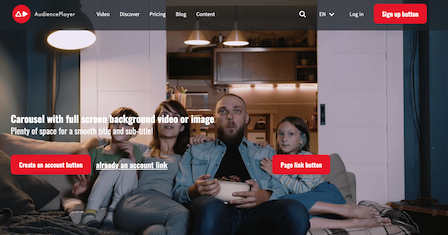
Your website is also your sales page. Lead visitors through four steps:
Attract
Open with a clear headline, possibly with a background video, that tells visitors straight away they are in the right place. Add a few unique selling points.
Build trust
Show reviews from customers and explain why you are an authority in your field. A short personal story helps visitors recognise themselves in what you offer.
Convince
List the benefits and show trailers or free preview videos. Keep the text short and concrete.
Sell
Show the price clearly with an obvious button to buy or subscribe. A free trial or time-limited discount gives people a reason to start now, and an FAQ removes the last doubts. Read more in how to create a user journey that increases subscriptions.
6. Launch, measure and improve
Go live as soon as you have a solid first offer. Don’t wait for perfection; your first customers will tell you what to improve. Track which videos are watched, where visitors drop off and which campaigns bring in buyers, and adjust your content, prices and pages based on what you learn. Like a garden, a video business needs regular attention to grow.
7. Expand to mobile apps and smart TV apps
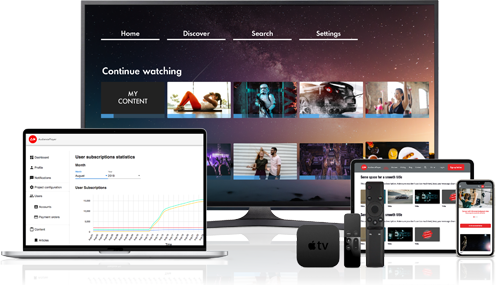
Once your website is running, you can reach your customers on more screens. Mobile apps let people watch on the go, download videos and get push notifications about new content. On the TV, casting with Chromecast and AirPlay or your own smart TV app brings your videos to the living room. The more convenient it is to watch, the more likely people are to keep paying.
Sell your videos with AudiencePlayer
With AudiencePlayer you launch your own video platform without technical knowledge: a website in your own branding, apps for iOS and Android, smart TV apps and live streaming. You choose from subscriptions, pay-per-view, rentals, bundles and vouchers, and viewers pay with iDEAL, credit card or PayPal through your own Mollie or Stripe account, so revenue goes straight to you. Request a demo to see how it works for your content.
Frequently Asked Questions
Where can I sell my videos online?
You can sell through a marketplace or on your own video platform. A marketplace gives you an existing audience but less control over pricing and customer data; your own platform lets you set prices, build your brand and keep the direct relationship with your buyers.
How much can I earn by selling videos online?
There is no standard amount. Your income depends on your niche, your price, the size of your audience and how consistently you market and add content. Start with a simple financial plan that shows how many paying customers you need to cover your costs.
Should I sell videos per video or with a subscription?
A subscription suits a library you update regularly and gives recurring revenue. Selling per video, series or course suits content with a clear end result, such as a training programme or a film. Many sellers combine both.
Do I need technical knowledge to sell videos on my own platform?
Not with a ready-made video platform. With AudiencePlayer you build your website with ready-made blocks, upload your videos and set up payments without writing code, and the team can also set up the platform for you.
How do customers pay for my videos?
On an AudiencePlayer platform you connect your own Mollie or Stripe account, and viewers pay with iDEAL, credit card, PayPal or other popular methods. In your mobile apps, they pay through the App Store and Google Play. You connect one payment provider per platform, and you need it even if everything you offer is free or voucher-based.