

On this page
Bitrate vs Upload Speed
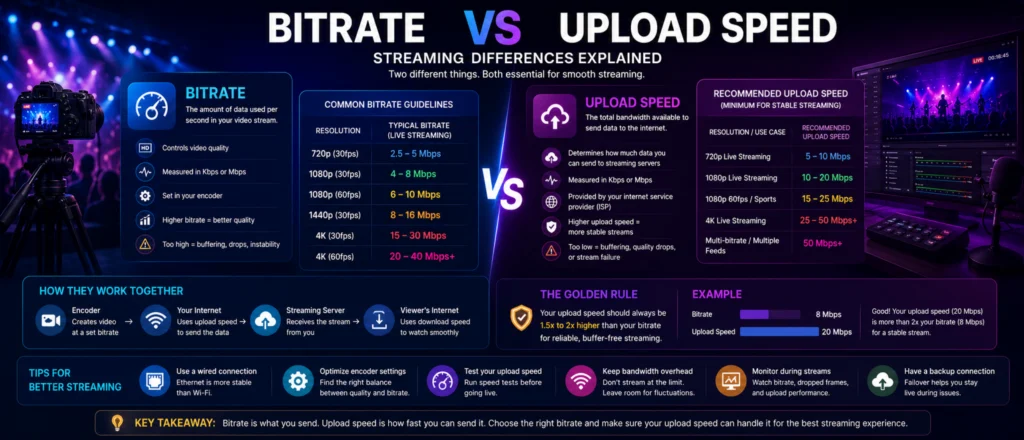
Bitrate and upload speed are closely related in streaming, but they are not the same thing. Bitrate refers to how much video data is being transmitted every second, while upload speed refers to the total internet bandwidth available to send that data.
Understanding the difference is essential for OTT streaming, live broadcasting, video quality optimization, and stable stream delivery.
Many streaming issues happen because bitrate settings exceed the available upload bandwidth, causing buffering, dropped frames, unstable playback, and lower video quality.
What Is Bitrate?
Bitrate measures the amount of video data transmitted every second during streaming. It is usually measured in kilobits per second (Kbps) or megabits per second (Mbps).
Higher bitrates generally produce better video quality because more visual detail is preserved. However, higher bitrates also require more upload bandwidth to transmit smoothly.
For example, a 1080p live stream may run at 6 Mbps bitrate, while a professional 4K stream could use 20 Mbps or more depending on the encoder and quality settings.
What Is Upload Speed?
Upload speed measures how quickly data can be transmitted from your device to the internet.
For live streaming, upload speed determines whether your connection can reliably deliver the selected video bitrate to streaming servers without interruptions.
Upload bandwidth is affected by your internet provider, network stability, wired vs wireless connections, congestion, and overall network quality.
How Bitrate and Upload Speed Work Together
Your upload speed must always exceed your target bitrate for stable streaming performance.
If your stream bitrate is too close to your maximum upload capacity, even small network fluctuations can cause buffering, dropped frames, or stream instability.
For example, streaming at 8 Mbps bitrate on a connection with only 9 Mbps upload speed creates very little overhead for stability.
Most professional streaming setups recommend maintaining upload bandwidth at least 1.5 to 2 times higher than the total bitrate, including audio.
Why Higher Bitrate Improves Video Quality
Higher bitrate settings allow encoders to preserve more image detail, motion clarity, and visual sharpness.
This becomes especially important for fast-moving content such as sports, gaming, concerts, and live events where compression artifacts are more visible.
However, increasing bitrate beyond available upload capacity can actually reduce stream quality because of instability and buffering.
Common Streaming Problems Caused by Incorrect Bitrate Settings
Setting bitrate too high for the available upload speed is one of the most common causes of live streaming issues.
Symptoms may include blurry playback, dropped frames, stream disconnects, increased latency, or buffering during broadcasts.
OTT platforms and broadcasters must balance bitrate quality with realistic network conditions to maintain stable delivery.
Recommended Bitrate and Upload Speed Ranges
Most 720p live streams use bitrates of about 3 to 8 Mbps, so plan for roughly 5–12 Mbps of stable upload speed.
1080p streams typically use about 5 Mbps (30 fps) up to 17 Mbps (high-quality 60 fps), with recommended upload speeds of 10–25 Mbps.
4K streaming uses roughly 15 to 50 Mbps of bitrate, which calls for about 25–75 Mbps of stable upload speed.
These recommendations vary depending on codec efficiency, frame rate, and streaming platform requirements. See our guide to the best upload speed for live streaming for more detail.
How Codecs Affect Bitrate Requirements
Modern codecs such as HEVC and AV1 can deliver similar video quality at lower bitrates compared to older codecs like H.264.
This helps reduce upload bandwidth requirements while maintaining visual quality, provided your streaming platform accepts these codecs. H.264 is still the most widely compatible choice.
For OTT platforms, codec optimization is an important part of reducing bandwidth costs and improving streaming efficiency.
Bitrate vs Upload Speed for Adaptive Streaming
Adaptive bitrate streaming uses multiple quality versions of the same stream to support different viewer devices and internet conditions.
If multiple renditions are encoded locally, upload bandwidth requirements increase because several streams may be transmitted simultaneously.
Cloud transcoding workflows can reduce local upload requirements by generating additional renditions after ingest.
Bitrate on AudiencePlayer
On AudiencePlayer, the platform creates the adaptive renditions for you. For live streaming, you send a single RTMP stream from an encoder such as OBS, so your upload only has to carry one bitrate. For on-demand videos, you upload one source file and the platform encodes it into several qualities.
For those source files, the file upload specifications ask for 8-bit H.264 at 25 fps with a minimum video bitrate of 6,000 kbps for HD and 20,000 kbps for 4K. Much higher bitrates rarely add visible quality, but they make files bigger and uploads slower. Keep each file under 25 GB.
Best Practices for Stable Streaming
Always test your upload speed before broadcasting live content. Streaming over wired ethernet connections improves stability compared to Wi-Fi.
Maintain bandwidth overhead above your target bitrate to protect against network fluctuations.
Lowering bitrate slightly can often improve overall stream reliability without significantly affecting viewer experience.
Professional OTT workflows also use backup internet connections and real-time monitoring tools to maintain stable delivery during critical broadcasts.
Why Understanding Bitrate Matters for OTT Platforms
Bitrate directly affects video quality, bandwidth usage, CDN costs, and viewer experience.
For OTT platforms, balancing bitrate efficiency with upload infrastructure is essential for delivering smooth, scalable streaming across multiple devices and network conditions.
As video resolutions continue increasing, understanding the relationship between bitrate and upload speed becomes even more important for maintaining reliable OTT streaming performance.
Frequently Asked Questions
What is the difference between bitrate and upload speed?
Bitrate is how much data your stream uses per second, set in your encoder. Upload speed is how much data your internet connection can send per second, and it has to be clearly higher than the bitrate.
What bitrate should I use for a 1080p live stream?
Around 5–8 Mbps works well for most 1080p streams at 30 fps. Fast-moving content at 60 fps benefits from more, up to about 12–17 Mbps, if your upload allows it.
How much higher should my upload speed be than my bitrate?
At least 1.5 times, and preferably twice, your total bitrate including audio. A 6 Mbps stream therefore needs 10–15 Mbps of stable upload.
Does a higher bitrate always mean better quality?
No. Above a certain point the difference is hard to see, and a bitrate close to your upload limit causes dropped frames and buffering that look far worse than a slightly lower setting.
What bitrate should my video files have for AudiencePlayer?
At least 6,000 kbps for HD and 20,000 kbps for 4K, in 8-bit H.264 with stereo AAC audio. The platform then encodes lower-bitrate versions for adaptive streaming automatically.