

On this page
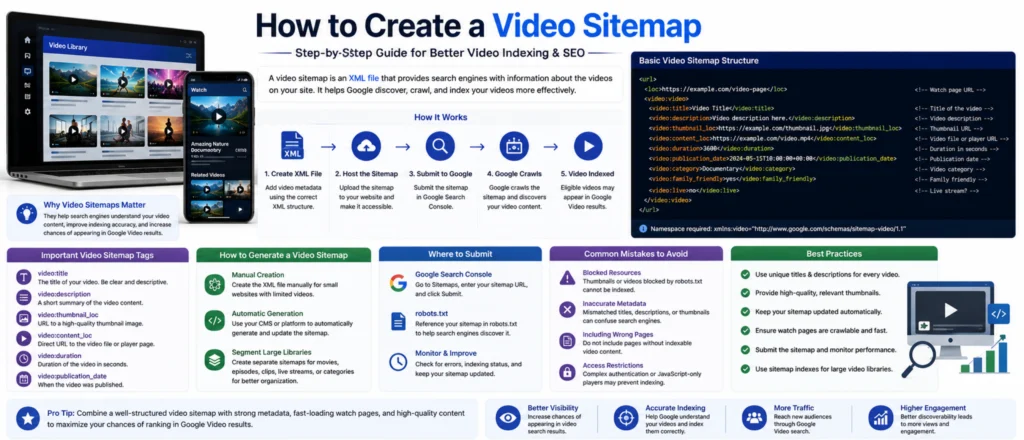
A video sitemap is an XML file that helps search engines discover, crawl, and index video content on your website. It provides structured metadata about each video, including titles, descriptions, thumbnails, durations, and playback URLs.
For OTT platforms, streaming services, publishers, and media companies, video sitemaps can improve visibility in Google Video results and help search engines better understand large video libraries.
Video sitemaps are especially important when videos are embedded dynamically, loaded through JavaScript, protected behind complex interfaces, or hosted within large streaming platforms.
Why Video Sitemaps Matter
Search engines do not always discover video content efficiently on their own. A video sitemap gives Google direct information about your videos and the pages where they appear.
This can improve indexing accuracy, increase the likelihood of appearing in video search features, and help Google associate metadata with the correct content.
For streaming platforms and OTT services, video sitemaps also help organize large catalogs containing episodes, movies, clips, trailers, and live streams.
How Video Sitemaps Work
A video sitemap uses XML formatting to list pages containing video content. Each entry includes metadata that helps search engines understand what the video is about and how users can access it.
The sitemap itself does not host the video. Instead, it acts as a discovery and metadata layer that points search engines to the correct watch pages.
Google then crawls those pages, evaluates the video content, and determines whether the videos are eligible for indexing and video search features. Submitting a sitemap is a hint, not a guarantee: Google only indexes a video when the watch page itself is indexed and the video is the main content of that page.
Basic Video Sitemap Structure
Each video entry starts with a standard <url> entry. The <loc> tag holds the URL of the watch page, and a <video:video> block inside it holds the video-specific tags. The sitemap also needs the video namespace declared in its root <urlset> element.
According to Google’s documentation, every video entry needs these tags:
<video:thumbnail_loc>: the URL of the thumbnail image<video:title>: the title of the video<video:description>: a description of up to 2,048 characters<video:content_loc>or<video:player_loc>: the URL of the video file, or of the player for that video (at least one of the two)
This structure tells search engines where the video exists and provides supporting metadata for indexing.
Important Video Sitemap Tags
The title and description should clearly explain the content of the video. These fields help search engines understand context and relevance.
The thumbnail URL is especially important because Google often uses thumbnails in video search results. Thumbnails should be accessible to Googlebot (not blocked by robots.txt or a login), high quality, and accurately represent the content.
The content location or player URL tells search engines where the actual video can be accessed or played. This is critical for proper discovery.
Optional tags include duration, publication date, expiration date, family-friendly settings, country restrictions, a live indicator, and whether a subscription is required. Older tags such as <video:category>, <video:price> and <video:tvshow> are deprecated by Google and can be left out.
How to Generate a Video Sitemap
Smaller websites may create video sitemaps manually, but most OTT and streaming platforms generate them automatically through their CMS or backend systems.
Automatic generation is important for large content libraries where videos are constantly added, updated, or removed. Dynamic sitemap generation ensures search engines always receive current metadata.
Many platforms generate separate sitemap files for movies, episodes, clips, live streams, or categories to improve organization and scalability. A single sitemap can hold up to 50,000 URLs or 50 MB uncompressed; beyond that, split it up and list the files in a sitemap index.
Where to Submit a Video Sitemap
Once the sitemap is created, it should be submitted through the Sitemaps report in Google Search Console. This allows Google to discover the sitemap faster and report any indexing or formatting issues.
The sitemap URL can also be referenced inside the site’s robots.txt file, with a line such as Sitemap: https://example.com/video-sitemap.xml, to help search engines find it during crawling.
After submission, Google may take time to crawl and process the video pages depending on site authority, crawl frequency, and content quality.
Common Video Sitemap Mistakes
One of the most common issues is using inaccessible thumbnail URLs or video files blocked by robots.txt. If Google cannot access the content, indexing may fail.
Another common problem is mismatched metadata between the sitemap and the actual watch page. Titles, descriptions, and thumbnails should remain consistent.
Some websites also include pages without indexable video content, or pages where the video only supports an article, which can reduce sitemap quality and create crawl inefficiencies.
For OTT platforms, dynamically loaded video players and authentication systems can sometimes prevent Google from properly detecting video content.
Video Sitemap Best Practices
Use unique titles and descriptions for every video page instead of duplicating metadata across multiple entries.
Keep sitemap files updated automatically as content changes. Outdated entries can create indexing issues over time.
Make sure watch pages are crawlable and include visible video content that users can access without technical barriers.
High-quality thumbnails, strong metadata, and fast-loading watch pages can improve both indexing and click-through rates from search results.
For larger streaming platforms, splitting video sitemaps into categorized sitemap indexes can improve scalability and management.
Video Sitemaps for OTT Platforms
OTT services often manage thousands of videos across multiple devices, regions, and content types. This makes structured indexing especially important.
Video sitemaps help OTT platforms surface episodes, movies, trailers, sports clips, and live streams more effectively in search engines.
Because many streaming platforms rely heavily on JavaScript-based interfaces, video sitemaps provide additional clarity for search engines that may otherwise struggle to detect embedded video content.
Paid content needs extra attention. If viewers must sign in or subscribe to watch, Google recommends marking the page with paywall structured data, and the thumbnail must remain publicly accessible. Public trailers or previews on their own watch pages are often the most reliable way to get a paid catalog into video results.
For large streaming libraries, automated video sitemap generation should be integrated directly into the OTT platform infrastructure. On AudiencePlayer, every video page has its own SEO fields and metadata, which gives you a consistent basis for titles and descriptions in search. For broader tips, see our guide to SEO.
Frequently Asked Questions
Which tags are required in a Google video sitemap?
Each video needs <video:thumbnail_loc>, <video:title>, <video:description> and either <video:content_loc> or <video:player_loc>, inside a <video:video> block under the watch page URL.
Can I add video tags to my existing sitemap?
Yes. Google accepts video tags inside an existing sitemap, a separate video sitemap, or an mRSS feed. A separate file is often easier to manage for large video libraries.
How many videos can one video sitemap contain?
A single sitemap can contain up to 50,000 URLs and may be no larger than 50 MB uncompressed. Larger catalogs should be split across several sitemaps grouped in a sitemap index file.
Does a video sitemap guarantee that my videos get indexed?
No. A sitemap helps Google find your videos, but Google still decides whether to index them. The watch page must be indexed and the video must be the main content of that page.
How do I check whether Google indexed my videos?
Use the Video indexing report in Google Search Console. It shows how many watch pages have an indexed video and the reasons why other videos were not indexed.