


On this page
Want to sell an online course? In short: choose a clear topic for a specific audience, decide what makes you different, structure and record your lessons as video, pick a pricing model, and sell through a platform where you own the customer relationship. Then market your course and keep improving it based on what students actually watch. This guide walks you through each step.
Step 1: Choose your topic and audience
Start with a skill you know well and a group of people who want to learn it. The more specific, the easier it is to sell: “yoga for runners” is easier to market than “yoga”. Check that there is demand before you record anything. Ask your existing audience, look at the questions people ask you most often, or pre-sell a first version to a small group.
Step 2: Decide what makes you different
There is plenty of free content online, so your course needs a clear reason to pay for it. Write down what sets you apart. Is it your teaching style, your experience, a proven method, personal feedback, or a course in a language or niche that nobody else covers? These points become the core of your sales page and your marketing.
Step 3: Structure your course
Work from the result: what should students be able to do after the course? Break that down into modules and short lessons, each with one clear goal. Think about your students while you do this:
- What do they already know when they start?
- Do the lessons need to be watched in a set order?
- How much time can they spend per lesson or per week?
- What material do they need next to the videos, such as exercises or worksheets?
Your course doesn’t have to be complete on day one. If you release lessons over time, publish a clear schedule so students know what to expect.
Step 4: Record your lessons
Video is the most engaging way to teach most practical skills. You don’t need a studio: a recent smartphone or camera, good light and, above all, clear sound go a long way. Students forgive simple visuals much sooner than bad audio. Keep lessons focused and cut out anything that doesn’t help the learning goal.
When you export, use a standard web format. On AudiencePlayer, MP4 with 8-bit H.264 video and stereo AAC audio is the safe choice. Professional export presets often add extra timecode tracks or 5.1 surround audio, which can cause processing to fail, so create a simple “web delivery” preset. The full requirements are in the file upload specifications.
Step 5: Choose a pricing model
How you charge shapes how you build and market your course. The most common options:
- One-off purchase: students pay once for lifetime or long-term access. Simple and familiar.
- Subscription or membership: students pay monthly or yearly for access to all your courses and new lessons. Works well if you keep adding content.
- Bundles: several courses in one package at a lower total price.
- Rentals: access for a set period, for example the length of a programme.
- Live sessions: paid live classes or Q&As next to the recorded course.
Not sure which one fits? Read online courses vs membership training: which model works better?
Step 6: Choose where to sell
You have roughly three options:
- Course marketplaces: they bring visitors, but you share revenue and have limited control over pricing, branding and contact with your students.
- Video sites and your own website: YouTube is built for reach, not for selling access, and a general website needs extra plugins for payments, logins and protected video. Read more in how to create an online course website with WordPress.
- Your own video platform: a platform built for selling video, with payments, accounts, protected streaming and apps in one place, under your own brand.
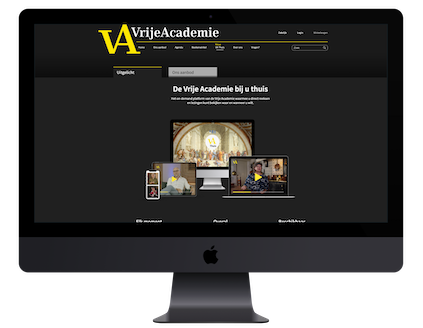
Whichever you choose, make it easy for students: they should see straight away what they are buying, and find their lessons again without searching.
Step 7: Launch and market your course
- Offer a free taste. A free first lesson or trailer shows your teaching style and lowers the barrier to buy.
- Build an email list. Collect sign-ups before launch and announce the course there first.
- Use a launch offer. A discount code for early buyers creates a reason to act now.
- Share short clips. Use social media to reach new people and send them to your own platform.
Step 8: Improve based on viewing data
After launch, look at what students actually watch. Lessons where many people drop off may be too long or unclear. Ask for feedback and update your course. Plan updates with your pricing in mind: if you sell a course as a one-off product, new lessons you add later don’t automatically reach earlier buyers on AudiencePlayer, because their original purchase is kept as it was. If you expect to add a lot of content, a subscription or a new bundle is often the better fit. For more on this, see why most online courses fail.
Sell your course with AudiencePlayer
With AudiencePlayer you sell your courses on your own video platform, in your own branding and without technical knowledge. You can sell a course as a single product or bundle, include it in a subscription, or combine models; see the revenue models. Students pay with iDEAL, credit card or PayPal through your own Mollie or Stripe account, and the revenue goes straight to your bank account.
- Course structure: for a short course, publish single videos grouped by category on a page. For a multi-part course, use series, seasons and episodes, with one episode per lesson.
- Free previews: a trailer is free for everyone and a preview is free for logged-in users, while the full lessons are only for paying students.
- Marketing tools: discount codes, free trials, abandoned cart reminders and automated emails help you convert visitors.
- Insights: see what is watched, for how long and on which device.
Mobile apps, smart TV apps and live streaming are modules you can add when you need them. Have a course idea? Request a demo and we’ll show you how it works with your content.
Frequently Asked Questions
How do I sell an online course without a marketplace?
Use your own video platform or website with payments, user accounts and protected video. You set your own prices, keep your student data and connect your own payment provider, so the revenue goes straight to your account.
Should I sell my course as a one-off purchase or a subscription?
A one-off purchase suits a finished course with a clear end result. A subscription suits you better if you keep adding lessons or have several courses, because students keep paying for ongoing value.
How long should online course videos be?
There is no fixed rule, but short lessons that each cover one clear goal are easier to follow and to fit into a busy day. Split long topics into several videos rather than recording one long session.
Do earlier buyers get lessons I add to a course later?
On AudiencePlayer, content added to a product later does not automatically reach people who bought it before, because their original purchase is kept as it was. If you plan to keep adding lessons, a subscription or a separate new product is usually the better choice.
Which video format should I upload for my course?
On AudiencePlayer, MP4 with 8-bit H.264 video and stereo AAC audio works best. Avoid 10-bit or HDR exports, 5.1 surround audio and extra timecode tracks, which can stop your video from processing or playing on some devices.