


On this page
SEO tips for your video platform start with one principle: Google ranks pages that answer a searcher’s question clearly, load quickly and are easy for its crawlers to understand. That hasn’t changed with AI Overviews and AI Mode. What has changed is how results are shown, and how much video pages can gain from good metadata. Many platforms focus on content, campaigns and their revenue model at launch, then discover weeks later that they can’t be found. These tips help you avoid that.
Start with what your audience searches for
Before you optimise anything, find out which words your audience actually uses. Think about the problems your videos solve (“beginner yoga for back pain”, “online barista course”), not just your brand name. Use Google’s autocomplete, the “People also ask” questions and the queries in Google Search Console to find them. Then give each important topic its own page, instead of trying to rank one page for everything.
Put your keywords where they count
- Page title: include the main topic, ideally near the start, and keep it readable. This is usually what people see as the blue link in Google.
- Meta description: Google doesn’t use it as a ranking factor, but a clear description can become the snippet under your link and convince people to click.
- URL: short, readable and descriptive, such as /yoga-for-back-pain/ instead of /video?id=8472.
- Headings: one clear main heading that matches the page topic, with subheadings that structure the content.
- First paragraph: answer the question directly. This helps visitors, and it’s the kind of passage that search features and AI summaries tend to draw on.
Write for people first. Repeating a keyword over and over doesn’t help, and Google ignores the old meta keywords tag entirely.
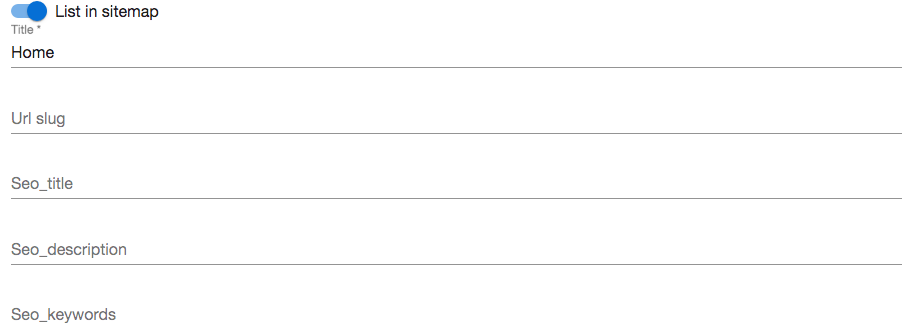
SEO input fields in AudiencePlayer
SEO in the age of AI Overviews
Google now answers many questions with an AI-generated overview at the top of the results, and AI Mode lets people ask follow-up questions in a conversation. Both draw on pages from Google’s regular index and link to them as sources. Google’s own guidance is that the same SEO fundamentals apply: there are no special AI files or extra markup needed to appear in these features.
In practice that means:
- Make sure important information is in the text on the page, not only inside a video, image or PDF.
- Answer specific questions clearly and concisely, then go deeper.
- Show real expertise: your own experience, examples and up-to-date facts.
- Make sure Googlebot isn’t blocked by robots.txt, a firewall or your CDN.
Video SEO: get your videos into Google
Video pages need a little extra work to show up in Google’s video results and video features:
- One watch page per video, where the video is the main content of the page, with its own title and description.
- VideoObject structured data with at least a title, description, thumbnail and upload date. Structured data must match what is visible on the page.
- A video sitemap that lists your watch pages, submitted in Google Search Console. Read how to create a video sitemap for SEO.
- A good thumbnail and a text description or transcript, so Google understands what the video is about.
- Paid content needs a public face. If your videos sit behind a paywall, give each title a public page with a description, a trailer or preview, so there is something to index. On AudiencePlayer, a trailer plays for everyone without logging in, while a preview is only shown to logged-in users, so the trailer is the one that makes your public page work.
The video indexing report in Search Console shows which of your videos Google has found and why others weren’t indexed. More background in how Google video indexing works for streaming platforms.
Speed and Core Web Vitals
Google measures page experience with Core Web Vitals: Largest Contentful Paint (how fast the main content appears, aim for 2.5 seconds or less), Interaction to Next Paint (how quickly the page responds, 200 milliseconds or less) and Cumulative Layout Shift (how much the layout jumps, 0.1 or less). Good scores won’t outrank better content, but they help when pages are otherwise similar, and they matter to visitors.
- Compress images and posters, and use modern formats.
- Don’t autoplay heavy video files above the fold; load the player efficiently.
- Make sure the page renders well on mobile, since Google indexes the mobile version first.
- For JavaScript-heavy sites, serve content that crawlers can read without running all the code, for example through server-side rendering.
Links: internal and external
Link related pages to each other with descriptive anchor text, so visitors and Google can find your best content. Links from other relevant websites, such as partners, press or industry blogs, remain one of the strongest signals that your platform is worth ranking.
SEO on your AudiencePlayer platform
With the AudiencePlayer website builder, every video page has its own SEO fields and metadata, so your content is easy to find in Google. You can run your site in multiple languages and add categories and search filters for a clear structure. With the MCP server, currently in beta, you can even ask an AI assistant to complete missing metadata across your catalogue. To measure results, you connect your own Google Analytics or Google Tag Manager: AudiencePlayer places no analytics trackers itself, and provides the cookie bar and consent options. Curious how it works? Request a demo.
Frequently Asked Questions
How long does it take for SEO changes to show in Google?
Usually a few weeks to a few months. Google first needs to recrawl your pages, and competitive keywords take longer. You can request indexing for important updated pages in Google Search Console.
Do I need to do anything special to appear in Google AI Overviews?
No special files or markup are needed. AI Overviews draw on pages from Google’s normal index, so the same SEO basics apply: helpful, clearly written content that answers specific questions and pages Google can crawl.
Does structured data improve my rankings?
Structured data is not a direct ranking factor, but it helps Google understand your page and can make it eligible for rich results, such as video results with a thumbnail. Only mark up content that is visible on the page.
How do I get my videos to show up in Google video results?
Give each video its own watch page where the video is the main content, add VideoObject structured data and a video sitemap, and check the video indexing report in Google Search Console.
Can Google index videos behind a paywall?
Google needs a page it can access to understand the video. Give each paid title a public page with a description, thumbnail and trailer or preview, so the title can appear in search results.