

On this page
Video sitemap errors can prevent search engines from properly discovering, crawling, and indexing video content. Even small technical problems can reduce visibility in Google Video search results and impact overall video SEO performance.
For OTT platforms and streaming services managing large video libraries, sitemap errors can quickly scale across thousands of pages if not monitored carefully.
Understanding the most common video sitemap issues helps improve discoverability, indexing consistency, and long-term search performance.
Why Video Sitemap Errors Matter
Search engines rely on video sitemaps to understand where video content exists and how it should be indexed. If the sitemap contains incorrect metadata, inaccessible assets, or invalid formatting, Google may ignore parts of the sitemap or fail to index the associated videos.
This can reduce traffic opportunities for watch pages, episodes, movies, clips, and livestreams.
For streaming platforms, indexing problems can also affect content discoverability across large catalogs where search visibility is critical for audience growth.
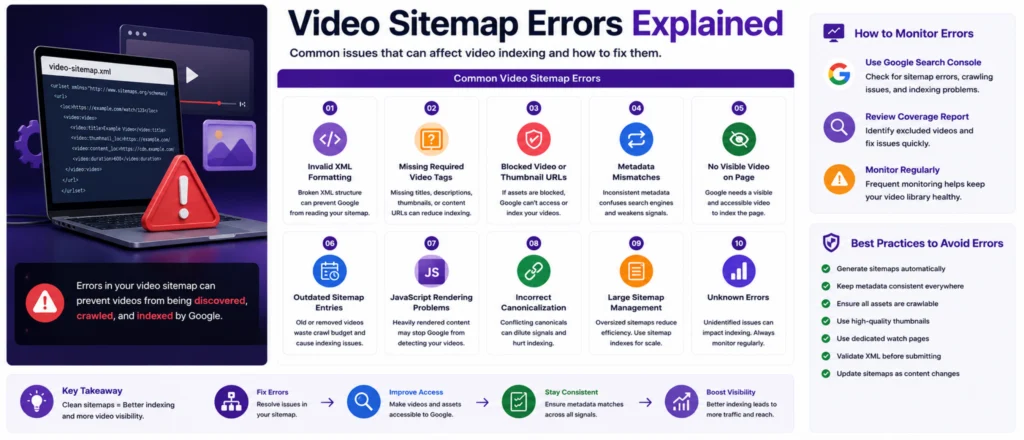
Invalid XML Formatting
One of the most common video sitemap issues is invalid XML structure. Missing tags, incorrect nesting, unsupported characters, or broken formatting can prevent search engines from reading the sitemap properly.
Even a small syntax mistake can cause entire sections of the sitemap to fail validation.
Video sitemaps should always follow Google’s supported XML structure and formatting guidelines.
Missing Required Video Tags
Google expects certain video metadata fields to exist within sitemap entries. The required tags are the title, description and thumbnail URL, plus either the video file location (content_loc) or the player URL (player_loc). Missing any of these can prevent videos from being processed correctly.
Incomplete metadata also makes it harder for search engines to understand what the content is about.
For OTT platforms, automated validation helps ensure every new video entry includes the required metadata fields. It is also worth removing tags Google no longer supports, such as category, gallery location, price and tvshow. They do not break the sitemap, but Google ignores them.
Blocked Video or Thumbnail URLs
Search engines must be able to access the video page, thumbnail image, and supporting assets. If these files are blocked through robots.txt, authentication layers, CDN restrictions, or firewall settings, indexing may fail.
Thumbnail accessibility is especially important because Google often uses thumbnails directly in video search results.
Streaming platforms should regularly test asset accessibility from external crawlers.
Metadata Mismatches
Metadata inconsistencies between the video sitemap, structured data, and visible watch page can confuse search engines.
For example, if the title in the sitemap differs from the title shown on the watch page, Google may treat the metadata as unreliable.
Titles, descriptions, thumbnails, durations, and publication dates should remain consistent across all indexing signals.
Pages Without Visible Video Content
Google expects the video to be clearly visible and playable on the page itself. Some websites submit URLs that technically exist but do not contain accessible video content.
This often happens when videos are hidden behind tabs, overlays, login walls, or unsupported JavaScript rendering. For content behind a login or subscription, add paywall structured data to the watch page so Google can still understand it.
For video indexing, the watch page should make the video easy for both users and search engines to find.
Outdated Sitemap Entries
Large OTT libraries change constantly as content is added, updated, or removed. Outdated sitemap entries can create crawl inefficiencies and reduce sitemap quality over time.
Expired livestreams, removed episodes, broken watch pages, or deleted thumbnails should be cleaned up automatically.
Streaming platforms should generate video sitemaps dynamically so search engines always receive current metadata.
JavaScript Rendering Problems
Many modern OTT platforms rely heavily on JavaScript-based interfaces. While Google can process some JavaScript, overly complex rendering can still create indexing problems.
If the video player or metadata only appears after advanced client-side rendering, search engines may struggle to detect the content consistently.
Video sitemaps help reduce this problem by giving Google direct metadata signals outside the rendered interface.
Incorrect Canonicalization
Canonical tag issues can confuse search engines about which video page should be indexed.
For example, if multiple URLs point to the same content but the canonical tags conflict with sitemap entries, indexing signals may become diluted.
Each important video page should have a clear canonical structure aligned with the sitemap URLs.
Large Sitemap Management Problems
OTT platforms often exceed standard sitemap size limits because of large streaming catalogs. A single sitemap file can contain at most 50,000 URLs or 50 MB uncompressed, so larger catalogs have to be split.
Trying to place every video into a single sitemap file can reduce crawl efficiency and create maintenance challenges.
Large platforms should use sitemap index files to organize content into smaller categories such as movies, episodes, live streams, clips, or genres.
How to Monitor Video Sitemap Errors
Google Search Console is one of the most important tools for identifying video sitemap issues. The sitemaps report shows whether Google could read your sitemap, and the video indexing report shows which watch pages have an indexed video and why others were not indexed.
Regular sitemap monitoring is especially important for streaming services where content changes frequently.
Platforms should also validate XML formatting automatically during sitemap generation to reduce large-scale technical issues.
Best Practices for Avoiding Errors
Video sitemaps should update automatically whenever content changes. Metadata should remain consistent across sitemaps, structured data, and watch pages.
All thumbnails, watch pages, and playback assets should remain crawlable and externally accessible.
Dedicated watch pages, strong metadata, clean XML formatting, and scalable sitemap organization help reduce indexing problems significantly.
For OTT platforms, sitemap generation should be integrated directly into the CMS or streaming infrastructure to maintain accuracy at scale.
On AudiencePlayer, every video page has its own SEO fields and metadata in the website builder, which makes it easier to keep titles and descriptions consistent between your pages and other indexing signals.
Frequently Asked Questions
How do I find errors in my video sitemap?
Submit the sitemap in Google Search Console and check the sitemaps report for read errors. The video indexing report then shows which videos were not indexed and why.
Why does Google say my video is not the main content of the page?
Google only shows video results for pages whose main purpose is to show a video. Pages where the video is small, hidden or secondary to the text often get this status. A dedicated watch page per video solves it.
What happens if my video sitemap is too large?
A sitemap file over 50,000 URLs or 50 MB uncompressed exceeds Google’s limits, and Search Console reports it as too large. Split it into smaller sitemaps and list them in a sitemap index file.
Should I remove expired videos from my sitemap?
Yes. Remove or update entries for removed episodes, expired livestreams and broken watch pages, so Google spends its crawl effort on content that is actually available.
Do unsupported sitemap tags cause errors?
Older tags such as category, price or tvshow are no longer supported by Google. They are ignored rather than fatal, but removing them keeps your sitemap clean and easier to debug.