

On this page
Video Sitemap Best Practices
Video sitemaps help search engines discover and understand video content more effectively. While simply having a sitemap is important, proper optimization is what improves indexing quality, video visibility, and long-term SEO performance.
For OTT platforms, streaming services, publishers, and media companies, video sitemap quality can directly impact how content appears in Google Video results and search features.
A well-structured sitemap improves crawl efficiency, strengthens metadata signals, and helps search engines process large video libraries more accurately. If you are starting from scratch, first read how to create a video sitemap for SEO.
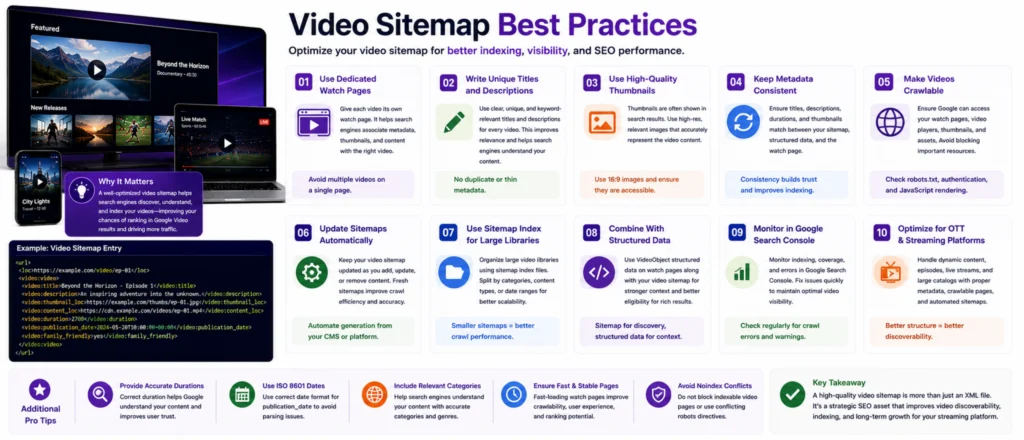
Use Dedicated Watch Pages
Each video should have its own dedicated watch page rather than sharing multiple videos on a single URL. Dedicated pages make it easier for Google to associate metadata, thumbnails, and structured signals with the correct video.
Watch pages should include visible video content, descriptive text, and clear metadata that matches the sitemap information. Google only indexes videos on pages where watching that video is the main purpose of the page, so a video that merely supports an article is unlikely to appear in video results.
For OTT platforms, this is especially important for episodes, movies, trailers, and clips that need individual indexing opportunities.
Write Unique Titles and Descriptions
Every video entry should use unique titles and descriptions instead of duplicated metadata across multiple pages.
Titles should clearly describe the content while naturally including relevant search terms. Descriptions should provide context about the video without keyword stuffing.
Strong metadata improves search relevance and helps search engines better understand the purpose of each video.
Use High-Quality Thumbnails
Thumbnails are one of the most important elements of video SEO because they are often displayed directly in search results.
Use clear, high-resolution thumbnail images that accurately represent the video content. Avoid blurry images, misleading visuals, or inaccessible thumbnail URLs. Google accepts common formats such as JPEG, PNG and WebP, requires at least 60 x 30 pixels and prefers larger images.
For streaming platforms, custom thumbnails can significantly improve click-through rates from Google Video search.
Keep Video Metadata Consistent
The metadata inside the video sitemap should match the metadata shown on the actual watch page. Inconsistencies between titles, descriptions, thumbnails, or durations can confuse search engines and reduce indexing accuracy.
Consistency across the sitemap, structured data, and visible page content creates stronger trust signals and improves crawl reliability. If you specify a thumbnail in several places, use the same thumbnail URL everywhere.
Make Videos Crawlable
Search engines must be able to access the video player, watch page, and thumbnail assets. Blocking resources through robots.txt or authentication systems can prevent indexing.
OTT platforms using JavaScript-heavy interfaces should ensure that video content is still detectable by search engines, without requiring a click or swipe before the video loads.
If Google cannot access the actual video or supporting assets, the page may fail to qualify for video indexing. For content behind a login or subscription, Google recommends paywall structured data on the watch page, while the thumbnail itself must stay publicly reachable.
Update Video Sitemaps Automatically
Streaming libraries change constantly as new videos are published and older content is updated or removed. Video sitemaps should refresh automatically to reflect those changes.
Outdated sitemap entries can create crawl inefficiencies and reduce overall sitemap quality over time. When a video is only available for a limited period, the optional expiration date tag tells Google when it stops being playable.
For large OTT platforms, automated sitemap generation should be integrated directly into the content management workflow.
Use Sitemap Index Files for Large Libraries
Large streaming platforms often manage thousands of video URLs. Instead of placing everything inside one massive sitemap, use sitemap index files to organize content into smaller groups. A single sitemap can hold at most 50,000 URLs or 50 MB uncompressed.
Separate sitemaps can be created for movies, episodes, clips, sports content, live streams, or categories.
This improves scalability, crawl efficiency, and long-term sitemap management.
Combine Video Sitemaps With Structured Data
Video sitemaps work best when paired with structured data markup on the watch page itself.
Structured data gives Google additional context about the video while the sitemap improves discovery and crawl efficiency.
Together, these signals strengthen video indexing and improve eligibility for enhanced search features. Read more in video sitemap vs schema markup.
Monitor Indexing in Google Search Console
After submitting a video sitemap, monitor indexing performance through Google Search Console.
The Sitemaps report shows processing errors, and the Video indexing report shows how many watch pages have an indexed video and why others were not indexed, such as inaccessible videos, missing thumbnails, or a video that is not the main content of the page.
Regular monitoring is especially important for OTT platforms with constantly changing content libraries.
Optimize for OTT and Streaming Platforms
OTT services face additional challenges because content is often dynamic, personalized, and delivered across multiple devices.
Video sitemaps help search engines understand episodes, live streams, trailers, and large media catalogs that may otherwise be difficult to crawl.
For streaming businesses, combining strong metadata, crawlable watch pages, structured data, and automated sitemap generation creates a stronger foundation for video SEO and discoverability. On AudiencePlayer, every video page has its own SEO fields and metadata, so you can give each title a unique, search-friendly description from the start.
Frequently Asked Questions
Should every video have its own page?
Yes, ideally. Google indexes videos on watch pages where the video is the main content, so a dedicated page per episode, film or clip gives each video its own chance to appear in video results.
What size should video thumbnails be for Google?
Google requires at least 60 x 30 pixels but prefers larger images. Use a sharp, representative image in a supported format such as JPEG, PNG or WebP, at a stable URL that Googlebot can access.
How often should a video sitemap be updated?
Whenever your library changes. For streaming platforms that means automatic generation, so new videos are added and removed videos disappear from the sitemap without manual work.
Can videos behind a paywall be indexed?
They can, if Google can find and fetch the video. Google recommends paywall structured data on the watch page, and the thumbnail must not require a login. Many platforms also publish free trailers on public pages.
Do I still need structured data if I have a video sitemap?
It is recommended. The sitemap helps Google discover your videos, while structured data on the watch page describes them and is required for features such as key moments and the LIVE badge.