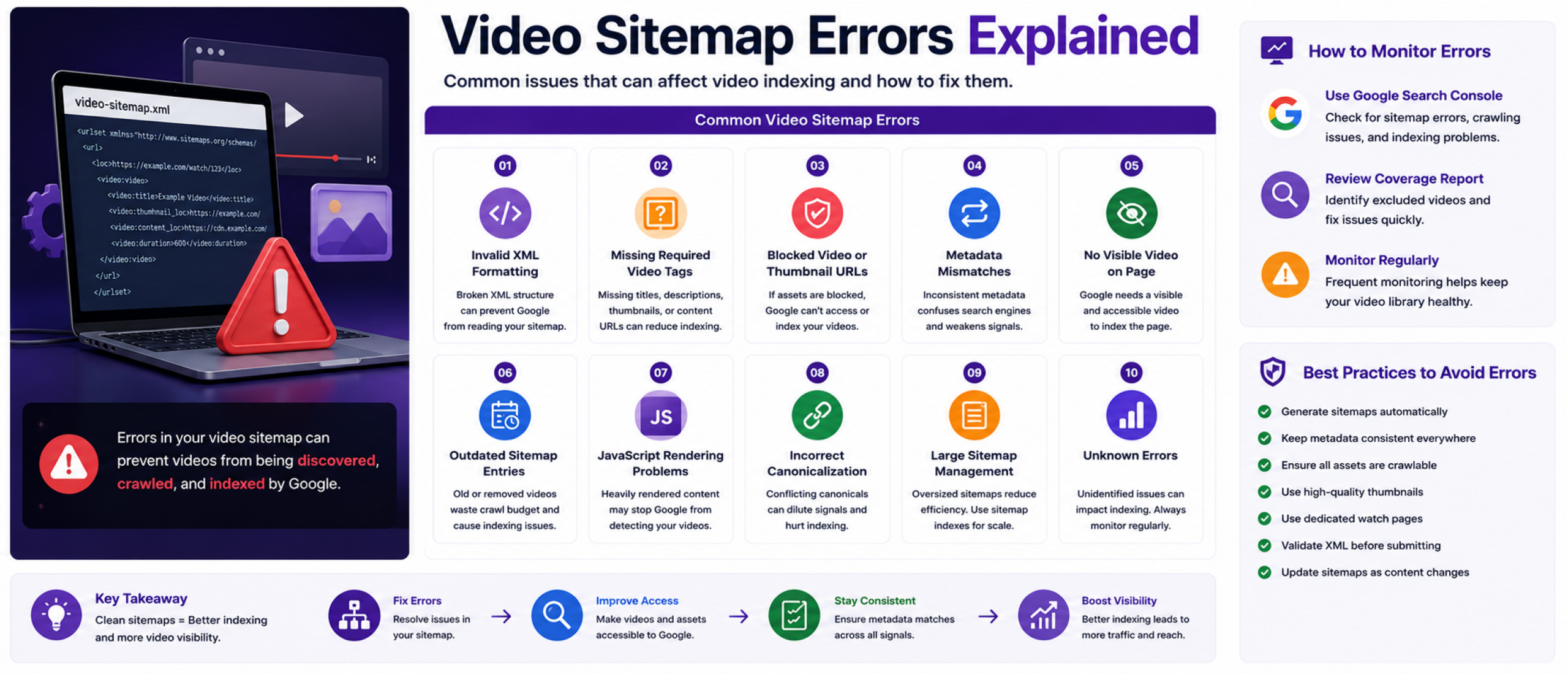
Video Sitemap Errors Explained
Video sitemap errors can prevent search engines from properly discovering, crawling, and indexing video content. Even small technical problems can reduce visibility in Google Video search results and impact overall video SEO performance.
For OTT platforms and streaming services managing large video libraries, sitemap errors can quickly scale across thousands of pages if not monitored carefully.
Understanding the most common video sitemap issues helps improve discoverability, indexing consistency, and long-term search performance.
Why Video Sitemap Errors Matter
Search engines rely on video sitemaps to understand where video content exists and how it should be indexed. If the sitemap contains incorrect metadata, inaccessible assets, or invalid formatting, Google may ignore parts of the sitemap or fail to index the associated videos.
This can reduce traffic opportunities for watch pages, episodes, movies, clips, and livestreams.
For streaming platforms, indexing problems can also affect content discoverability across large catalogs where search visibility is critical for audience growth.
Invalid XML Formatting
One of the most common video sitemap issues is invalid XML structure. Missing tags, incorrect nesting, unsupported characters, or broken formatting can prevent search engines from reading the sitemap properly.
Even a small syntax mistake can cause entire sections of the sitemap to fail validation.
Video sitemaps should always follow Google's supported XML structure and formatting guidelines.
Missing Required Video Tags
Google expects certain video metadata fields to exist within sitemap entries. Missing titles, descriptions, thumbnails, or playback URLs can reduce indexing quality or prevent videos from being processed correctly.
Incomplete metadata also makes it harder for search engines to understand what the content is about.
For OTT platforms, automated validation helps ensure every new video entry includes the required metadata fields.
Blocked Video or Thumbnail URLs
Search engines must be able to access the video page, thumbnail image, and supporting assets. If these files are blocked through robots.txt, authentication layers, CDN restrictions, or firewall settings, indexing may fail.
Thumbnail accessibility is especially important because Google often uses thumbnails directly in video search results.
Streaming platforms should regularly test asset accessibility from external crawlers.
Metadata Mismatches
Metadata inconsistencies between the video sitemap, structured data, and visible watch page can confuse search engines.
For example, if the title in the sitemap differs from the title shown on the watch page, Google may treat the metadata as unreliable.
Titles, descriptions, thumbnails, durations, and publication dates should remain consistent across all indexing signals.
Pages Without Visible Video Content
Google expects the video to be clearly visible and playable on the page itself. Some websites submit URLs that technically exist but do not contain accessible video content.
This often happens when videos are hidden behind tabs, overlays, login walls, or unsupported JavaScript rendering.
For video indexing, the watch page should make the video easy for both users and search engines to find.
Outdated Sitemap Entries
Large OTT libraries change constantly as content is added, updated, or removed. Outdated sitemap entries can create crawl inefficiencies and reduce sitemap quality over time.
Expired livestreams, removed episodes, broken watch pages, or deleted thumbnails should be cleaned up automatically.
Streaming platforms should generate video sitemaps dynamically so search engines always receive current metadata.
JavaScript Rendering Problems
Many modern OTT platforms rely heavily on JavaScript-based interfaces. While Google can process some JavaScript, overly complex rendering can still create indexing problems.
If the video player or metadata only appears after advanced client-side rendering, search engines may struggle to detect the content consistently.
Video sitemaps help reduce this problem by giving Google direct metadata signals outside the rendered interface.
Incorrect Canonicalization
Canonical tag issues can confuse search engines about which video page should be indexed.
For example, if multiple URLs point to the same content but the canonical tags conflict with sitemap entries, indexing signals may become diluted.
Each important video page should have a clear canonical structure aligned with the sitemap URLs.
Large Sitemap Management Problems
OTT platforms often exceed standard sitemap size limits because of large streaming catalogs.
Trying to place every video into a single sitemap file can reduce crawl efficiency and create maintenance challenges.
Large platforms should use sitemap index files to organize content into smaller categories such as movies, episodes, live streams, clips, or genres.
How to Monitor Video Sitemap Errors
Google Search Console is one of the most important tools for identifying video sitemap issues. It can reveal indexing failures, inaccessible videos, invalid URLs, and metadata problems.
Regular sitemap monitoring is especially important for streaming services where content changes frequently.
Platforms should also validate XML formatting automatically during sitemap generation to reduce large-scale technical issues.
Best Practices for Avoiding Errors
Video sitemaps should update automatically whenever content changes. Metadata should remain consistent across sitemaps, structured data, and watch pages.
All thumbnails, watch pages, and playback assets should remain crawlable and externally accessible.
Dedicated watch pages, strong metadata, clean XML formatting, and scalable sitemap organization help reduce indexing problems significantly.
For OTT platforms, sitemap generation should be integrated directly into the CMS or streaming infrastructure to maintain accuracy at scale.